


Artificial intelligence is often discussed in terms of major business transformation, but some of its most useful applications are much more ordinary. Employees spend a considerable part of their working day searching for information, reviewing documents, preparing reports, answering recurring questions, and keeping project knowledge organized. These activities may not seem especially complex, yet together they can consume a significant amount of time.
Private AI can help businesses improve these everyday activities by connecting AI capabilities with their own documents, procedures, project records, and organizational knowledge. Instead of relying only on general information, employees can work with an AI assistant that has access to selected company knowledge sources, subject to the organization’s configuration and access controls.
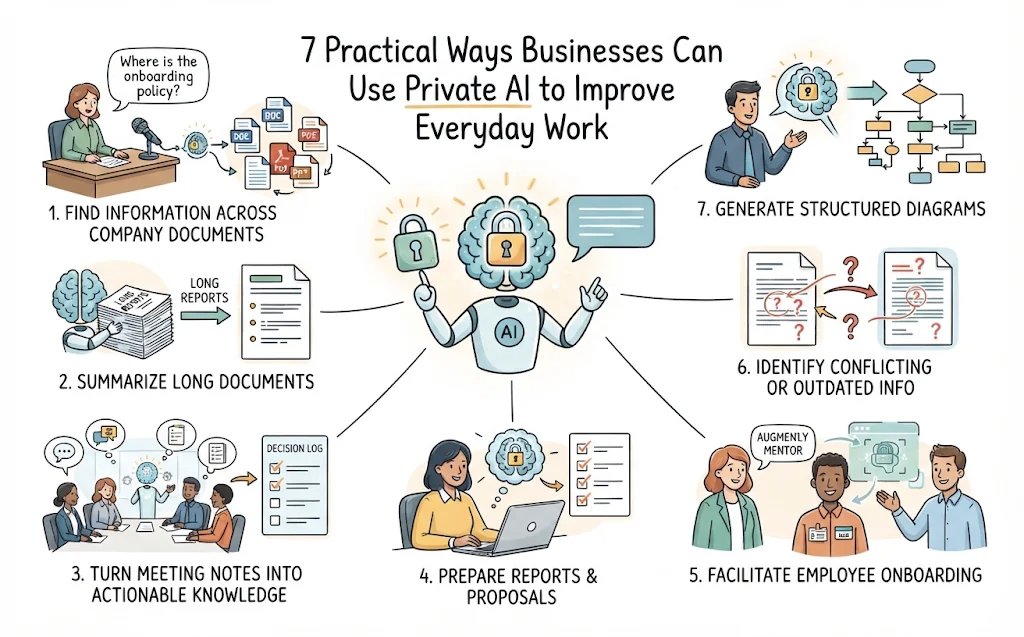
Here are seven practical ways businesses can use private AI to make everyday work more efficient.
1. Help Employees Find Information Across Company Documents
In many organizations, useful information is spread across Word documents, PDFs, spreadsheets, presentations, project notes, internal guidelines, and shared folders. Employees may know that an answer exists somewhere, but finding the correct document or locating the relevant passage can take longer than expected.
A private AI knowledge assistant can make this process more conversational. Instead of searching through folders or trying different keywords, an employee can ask a question in natural language, such as:
- What is our current procedure for approving a supplier?
- Which requirements were agreed upon for the latest project phase?
- What does our employee onboarding policy say about equipment requests?
- Which document describes the reporting process for this department?
When connected to appropriate company knowledge sources, the AI assistant can retrieve relevant information and formulate an answer based on the available material. This can reduce the time employees spend looking for information and make existing documentation easier to use.
The quality of the result depends on the information available to the system. Organizations should keep important documents current, organize knowledge sources sensibly, and ensure that employees only access information they are authorized to see.
2. Summarize Long Documents and Extract Key Information
Employees regularly receive documents that require careful reading: business proposals, project specifications, meeting records, policy documents, research reports, and technical materials. Reading every document in full may be necessary for some decisions, but it is not always the best first step when someone needs an overview.
AI can help produce an initial summary, identify important points, and organize information into a more convenient format.
For example, an employee could ask an AI assistant to:
- Summarize a lengthy project proposal into its main objectives, scope, and deliverables.
- Extract important dates, responsibilities, and action items from a project document.
- Compare two versions of an internal policy and highlight apparent changes.
- Identify the main risks and unresolved questions mentioned in a business report.
- Turn a lengthy technical document into a short briefing for non-technical stakeholders.
This is particularly useful when employees need to review large volumes of information before a meeting or decision. The AI-generated summary gives them a starting point, allowing them to focus their attention on the sections that require closer examination.
However, summaries should not automatically replace the original documents. Important figures, qualifications, exceptions, and contractual wording should always be checked against the source material before being used in formal decisions.
3. Turn Meeting Notes into Actionable Business Knowledge
Meetings generate valuable information, but much of it can become difficult to retrieve after the meeting ends. Decisions may be recorded in one document, action items in another, and follow-up discussions in email threads or chat messages. Over time, employees may struggle to understand why a decision was made or whether an earlier issue has already been resolved.
A private AI solution connected to an organized repository of meeting notes can help teams make better use of this information.
For example, employees could ask:
- What decisions were made during the last three project meetings?
- Which tasks were assigned to the design team?
- What concerns did the customer raise about the proposed solution?
- Has the team previously discussed this requirement?
- Which issues remain unresolved across the recorded meetings?
AI can also help transform meeting records into structured outputs, such as summaries, decision logs, action lists, and follow-up reports.
The important idea is to treat meeting notes as part of the organization’s continuing knowledge, rather than isolated records that are rarely consulted again. When notes are collected and organized consistently, AI can help employees retrieve and connect information from different discussions.
4. Prepare Reports, Proposals, and Internal Documents
Writing business documents is another everyday activity that can benefit from AI assistance. Employees often need to turn existing information into a more structured deliverable, even when the underlying facts have already been collected.
For example, an AI assistant can help prepare:
- Project progress reports based on collected updates.
- Management summaries based on longer internal documents.
- Initial drafts of business proposals and project plans.
- Product or service descriptions based on approved reference material.
- Internal procedure documents and knowledge articles.
- Briefing documents that bring together information from several sources.
Businesses can also create reusable AI prompts for recurring document-generation tasks. A team might define a standard prompt that instructs the AI to prepare a project status report using a consistent structure, including completed work, outstanding tasks, risks, and next steps.
This approach can help standardize routine documentation and reduce the effort required to produce a first draft. Employees can then review the content, correct inaccuracies, add professional judgment, and approve the final document.
For organizations with established documentation standards, reusable prompts can be especially helpful because they give employees a consistent starting point for producing recurring deliverables.
5. Make Employee Onboarding and Knowledge Sharing Easier
When a new employee joins a company, they need to learn more than their immediate job responsibilities. They also need to understand internal procedures, department practices, project terminology, organizational policies, and the background behind important decisions.
Traditionally, this knowledge is transferred through training sessions, conversations with experienced colleagues, and the employee’s own efforts to search through internal documents.
A private AI assistant connected to suitable organizational knowledge can provide another way to support this process. New employees can ask questions as they learn, such as:
- Where can I find the guidelines for submitting a project expense?
- What are the main steps in our customer onboarding process?
- Which internal tools does this team use for project coordination?
- What background information should I understand before joining this project?
This can make existing knowledge more accessible and reduce the need for employees to repeatedly ask colleagues questions that are already answered in company documentation.
It can also help preserve institutional knowledge when experienced employees move to other roles or leave the organization. Their documented procedures, project notes, and recorded decisions can remain useful to the wider team.
AI does not replace mentoring or direct communication with colleagues. Instead, it provides an additional knowledge resource that employees can consult whenever they need guidance.
6. Identify Conflicting or Outdated Information
As a business grows, its documentation evolves. Policies are revised, project requirements change, and different departments may maintain their own records. Sometimes, two documents contain conflicting information. In other cases, an older procedure remains in circulation even after a new one has been introduced.
These inconsistencies can create confusion, especially when employees are unsure which version of a document should be followed.
AI can help review related information and highlight possible differences. For example, an employee could ask an AI assistant to:
- Compare the requirements recorded in two project documents.
- Identify differences between an older and a newer procedure.
- Find meeting notes that appear to contradict a current project specification.
- Highlight unresolved questions mentioned in several discussions.
- Identify documents that may need review because they refer to different processes.
This type of analysis can be particularly valuable for project teams, consultants, and organizations that maintain extensive documentation.
It is important to treat AI-identified conflicts as items for investigation rather than definitive findings. Two documents may appear inconsistent because they refer to different dates, departments, project versions, or circumstances. A responsible employee should examine the original sources and determine which information is authoritative.
7. Turn Written Ideas and Requirements into Structured Diagrams
Not every business task ends with a written document. Teams also need to communicate processes, systems, organizational structures, and project requirements visually.
Creating these diagrams manually can take time, particularly when the information starts as unstructured notes or lengthy written descriptions.
AI-assisted diagramming can help turn text-based information into visual representations. Depending on the tools available, employees may be able to generate:
- Flowcharts that explain business procedures.
- Business process diagrams that show activities, decisions, and responsibilities.
- Organizational charts that illustrate reporting structures.
- System architecture diagrams that communicate technical components and relationships.
- UML diagrams that describe software systems and their behavior.
- Entity-relationship diagrams that help teams understand data structures.
For example, a business analyst could provide a written description of a customer approval process and ask AI to produce an initial process diagram. The analyst can then review the result, correct missing steps, and refine the model with stakeholders.
This can make it easier for teams to move from discussions and written requirements to a shared visual understanding. It also creates a useful starting point for documentation, reviews, and further development.
What Makes Private AI Useful for These Business Activities?
Many of the activities described above can also be performed with general-purpose AI tools. The difference is that private AI can be configured to work with an organization’s own knowledge sources and deployment requirements.
For businesses, this distinction matters because everyday work often depends on information that general AI services do not automatically know: internal procedures, project history, customer-specific requirements, company terminology, and established ways of working.
A private AI environment can provide a more relevant working context by connecting an AI assistant to selected corporate documents and knowledge repositories. Depending on the deployment model, organizations may also have greater control over infrastructure, AI endpoints, access arrangements, and how employees use the system.
Private AI does not automatically guarantee security or accuracy. Organizations still need to consider access permissions, data handling, infrastructure, provider terms, and the suitability of the AI model. They should also establish clear rules for reviewing AI-generated content, especially when it affects customers, compliance, finances, or important business decisions.
For practical guidance on managing these considerations, organizations can consult the UK government’s AI Risk Management Toolkit, which discusses issues such as human oversight, testing, monitoring, and the limitations of AI systems.
How to Start Using Private AI in Your Organization
Businesses do not need to automate every process at once. A more manageable approach is to begin with a few recurring activities where employees already spend time searching for information or preparing documents.
Start with a specific workplace problem
Identify a task that employees perform frequently. It might be finding information in internal documents, summarizing meeting notes, preparing project reports, or answering recurring procedural questions.
Choose the knowledge sources
Determine which documents, notes, policies, or project records the AI assistant should use. Begin with information that is relevant, reasonably well-organized, and appropriate for the intended users.
Define how employees should use the AI
Establish practical guidelines covering permitted information, access rights, verification of answers, and situations that require human approval. Reusable prompts can also help employees perform common tasks consistently.
Evaluate the results
Test the solution with real workplace questions and tasks. Look at whether employees can find information more easily, whether generated documents require less initial effort, and whether the answers are sufficiently accurate and useful.
Use feedback from employees to refine the knowledge sources, prompts, and workflows before expanding to other departments.
Bringing Private AI into Everyday Business Work
The value of business AI does not have to come from one dramatic transformation. It can also come from improving many small activities that employees perform every day: finding information, understanding documents, preparing reports, sharing knowledge, and communicating ideas.
When AI can work with relevant company knowledge, these activities become more closely connected to the way an organization actually operates. Employees spend less time starting from scratch and have more opportunities to build on information the business has already collected.
For organizations looking to put this approach into practice, Visual Paradigm’s Private AI solution for enterprise knowledge brings together a coordinated set of software tools and implementation services. The offering includes NotesKeep for organizing corporate notes and documents, an AI Chatbot for asking questions using selected knowledge sources, OpenDocs for creating and sharing documentation, and diagramming tools for visualizing processes and systems.
Visual Paradigm also provides deployment setup, team training, and ongoing technical support. Organizations can explore self-hosted infrastructure options or connect the tools to a cloud AI provider using their own account and endpoint credentials, depending on their requirements.
The practical goal is straightforward: make company knowledge easier to use and help employees turn that knowledge into useful work.
Frequently Asked Questions
What are common private AI use cases in business?
Common use cases include searching internal documents, summarizing reports, analyzing meeting notes, preparing business documents, supporting employee onboarding, identifying inconsistencies in company information, and generating diagrams from written requirements.
How is private AI different from using a general AI chatbot?
A general AI chatbot primarily works with its model’s existing knowledge and the information supplied in a conversation. A private AI solution can be configured to retrieve information from selected company knowledge sources, making its responses more relevant to internal processes and organizational context. The actual level of privacy and control depends on the deployment and configuration.
Can private AI help employees who are not technical specialists?
Yes. Many practical uses involve everyday activities such as asking questions about company procedures, summarizing documents, drafting reports, and finding project information. Employees can interact with an AI assistant using natural language without needing to understand how the underlying AI model works.
Does private AI replace employees or business experts?
No. Private AI is best treated as an assistant that helps employees retrieve information, prepare initial drafts, and analyze material. People remain responsible for applying professional judgment, verifying important information, making decisions, and approving final deliverables.
Does a business need to build its own AI model to use private AI?
Not necessarily. Some private AI deployments use self-hosted models, while others connect business applications to an external AI provider through an organization’s own account and endpoint configuration. The appropriate approach depends on the organization’s technical, operational, and data-handling requirements.

 English
 Arabic
 Chinese (Simplified)
 Dutch
 French
 German
 Italian
 Japanese
 Korean
 Portuguese
 Russian
 Spanish