


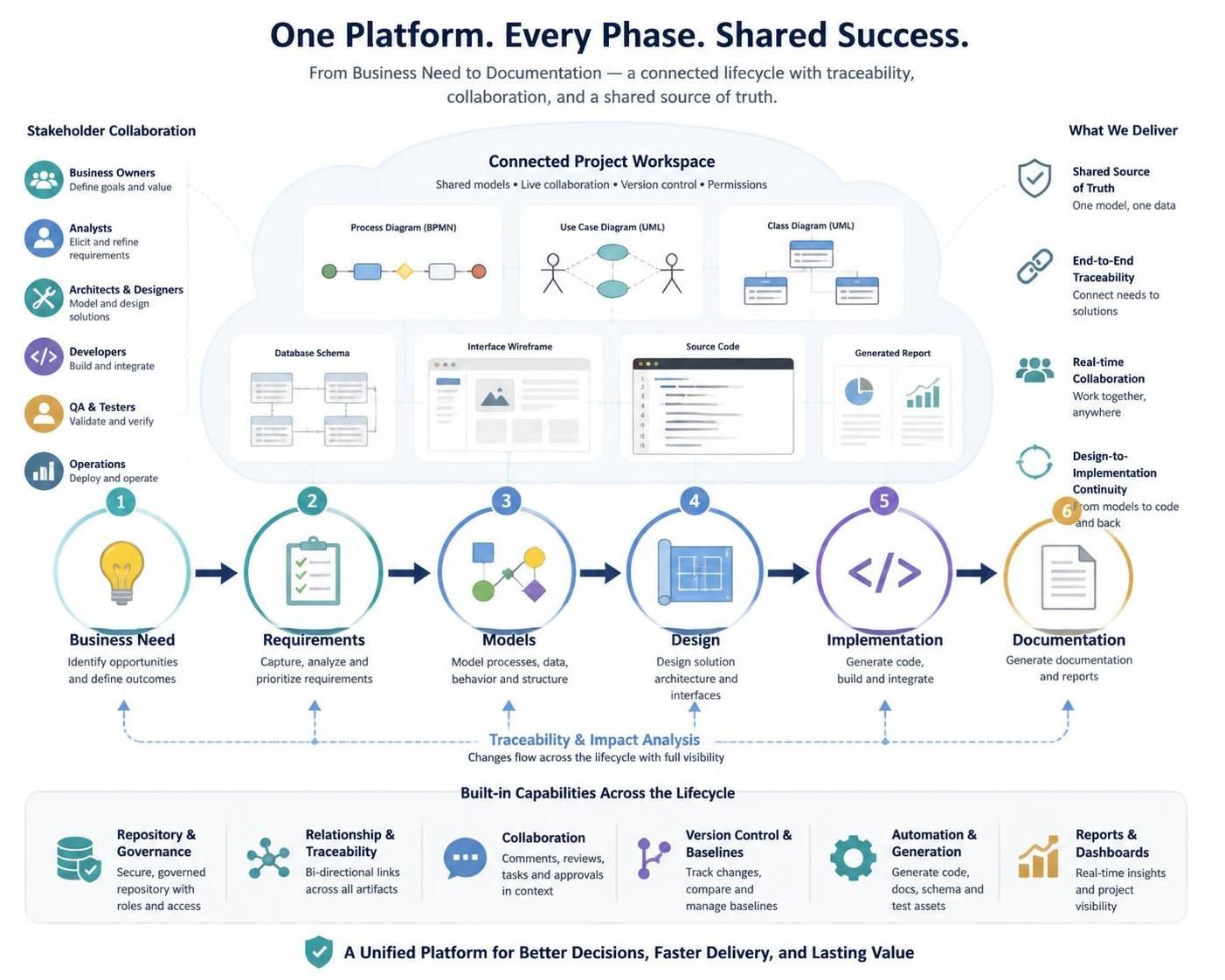
A unified project platform connects business goals, requirements, models, design, implementation, testing, and documentation in one coherent workspace. The value is not simply having many tools in one application: it is being able to connect the information those tools produce.
When a business objective links to a requirement, the requirement to a model, and the model to implementation and tests, teams can follow how the original need becomes a delivered result. That shared chain helps reduce information silos, clarify decisions, and assess the effects of change. The Visual Paradigm post describes this approach as a continuous lifecycle rather than a set of isolated phases.
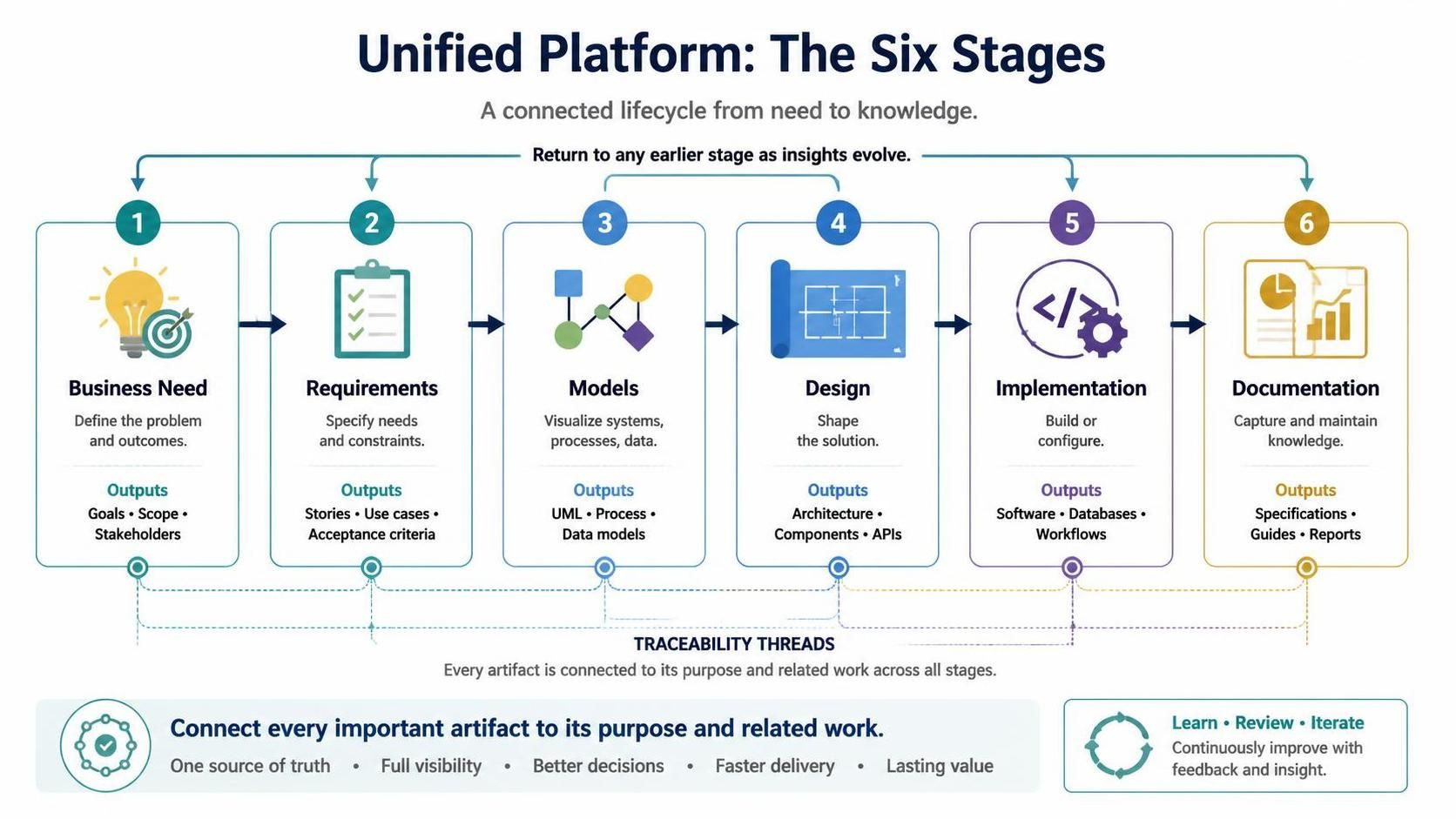
Unified Platform: The six stages
Treat these stages as connected activities. Teams may revisit earlier work as they learn more or requirements change.
| Stage | What to do | Typical outputs |
|---|---|---|
| 1. Business need | Define the problem, opportunity, or outcome the project should address. Focus on why the work matters before choosing a technical solution. | Goals, problem statements, stakeholder descriptions, scope, capability maps, high-level process diagrams |
| 2. Requirements | Translate the business need into specific, reviewable expectations. Include what the system must do and the constraints it must satisfy. | User stories, use cases, functional and nonfunctional requirements, business rules, acceptance criteria |
| 3. Models | Use visual representations to clarify systems, processes, data, behavior, or architecture. Choose models that help explain or decide something. | UML diagrams, process models, data-flow diagrams, entity-relationship models, architecture diagrams, customer journeys |
| 4. Design | Turn requirements and models into a more detailed solution structure. Connect design choices to the needs they address. | Architecture, components, database schemas, interfaces, APIs, deployment plans, detailed workflows |
| 5. Implementation | Build or configure the solution using the approved requirements and design as guidance. Keep implementation references connected to the relevant project artifacts. | Software, databases, configured workflows, development tasks, implementation mappings |
| 6. Documentation | Capture project knowledge so it can be shared, reviewed, maintained, and reused. Keep documents aligned with the underlying artifacts. | Specifications, architecture documents, user and API documentation, test specifications, reports, operating procedures |
A useful rule throughout the lifecycle: if an artifact matters, record both its purpose and its relationship to the work around it.
Build traceability through the project
Traceability means being able to follow relationships between project artifacts—for example, from a business objective to the requirement that supports it, the design that satisfies it, and the test that verifies it.
A basic chain might be:
Business need → Requirement → Use case → Design element → Implementation → Test → Documentation
This chain helps teams answer practical questions:
-
Which business objective does this feature support?
-
Has each important requirement been designed and implemented?
-
What might be affected if a requirement changes?
-
Which tests verify that the requirement has been met?
-
Which documents need updating?
For a small project, links between related artifacts may be enough. For a larger project, a traceability matrix can make gaps easier to see:
| Business objective | Requirement | Design or model | Implementation reference | Verification |
|---|---|---|---|---|
| Reduce processing time | Automate the approval workflow | Activity and process models | Workflow service | Performance and acceptance tests |
| Improve customer access | Provide a self-service portal | Use cases and UI design | Portal application | Usability and functional tests |
| Protect sensitive data | Enforce role-based access | Security and deployment models | Authorization service | Security tests |
The examples and lifecycle connections above follow the post’s suggested traceability approach. Adapt the artifacts to the project rather than creating links or diagrams just to fill in a template.
Use the workspace as a shared project source
A connected workspace is most useful when it makes related information easy to find and reduces unnecessary duplication. Without that connection, teams may end up with conflicting versions of requirements, diagrams that no longer match the implementation, repeated data entry, or uncertainty about which file is current.
Set up a consistent project structure for areas such as business analysis, requirements, models, architecture and design, data, implementation references, documentation, and reviews. Use shared naming conventions, and link to a common artifact instead of copying the same information into multiple places.
A unified environment can also make it easier to move between tasks. For example, an analyst can move from a process model to its requirements, while an architect or developer can consult the related design and technical documentation. The goal is to bring the next useful piece of information into context, not to make every role work in the same way.
Choose models that help people work
Models give teams a visual way to discuss complexity. The right model depends on the question being explored:
-
Process or activity models can clarify workflows.
-
Use-case diagrams can show how people interact with a system.
-
Class or sequence diagrams can help describe software structure or behavior.
-
Entity-relationship models can clarify data structures.
-
Architecture and deployment views can explain components and their environment.
-
Customer journeys or prototypes can help discuss user experience.
Different stakeholders may need different views of the same project. Business stakeholders may benefit from goals, process flows, use cases, prototypes, and summary reports. Developers, architects, and database specialists may need detailed requirements, technical diagrams, data models, API definitions, and deployment views.
Keep diagrams current and use consistent terminology. A model should support a real explanation, decision, or engineering activity; otherwise, it may add maintenance work without much value.
Connect design to implementation
Design artifacts are more useful when they inform actual implementation rather than being created once and left behind. For example, a data model can inform database work, a service model can clarify API boundaries, and a component diagram can describe application structure.
To maintain alignment:
-
Link implementation elements to the models or requirements they realize.
-
Record significant design decisions and assumptions.
-
When implementation changes, review whether related models and documents need updating.
-
Check that derived or generated artifacts still reflect current project information.
-
Keep models at a level of detail the team can maintain.
The aim is not to diagram every line of code. It is to preserve enough useful structure to support communication, design, analysis, and maintenance.
Collaborate through regular reviews
A shared platform can help business and technical participants work from related information, but the tool alone does not create collaboration. Make review part of the project’s routine.
A practical cycle is:
-
Capture the business objective.
-
Define and review requirements.
-
Model the relevant processes and system behavior.
-
Design the proposed solution.
-
Review the design with appropriate stakeholders.
-
Implement the approved solution.
-
Update models and documentation as the system changes.
-
Validate that the delivered result addresses the original need.
Invite people who can assess the work from different perspectives: business analysts, product owners, subject-matter experts, designers, architects, developers, database specialists, testers, writers, and operations staff. Record important decisions and connect them to the requirements or problems they address.
Keep documentation reliable
Connected artifacts can help reduce contradictory documents and repeated data entry. Reports and specifications assembled from maintained project information may also be easier to review and update.
Automation is not a substitute for ownership, however. For each important artifact, decide who creates it, who reviews and approves it, how changes are managed, and what related items may need attention when it changes. Documentation should evolve with the project, not be left until the end.
A suggested working method
Use this sequence as a practical starting point:
-
Define the business context: Record the problem, opportunity, objectives, stakeholders, and boundaries.
-
Capture requirements: Include functional needs, quality expectations, business rules, constraints, and acceptance criteria.
-
Create useful models: Select diagrams that clarify the problem, support a decision, or guide engineering.
-
Link related artifacts: Connect objectives to requirements, requirements to models, and models to design, implementation, and tests.
-
Review collaboratively: Let business and technical stakeholders review the project from the perspectives relevant to them.
-
Develop the solution: Use approved requirements and designs to guide implementation.
-
Assess changes: When a requirement or design changes, identify potentially affected models, components, tests, and documents.
-
Maintain documentation: Produce and update specifications, reports, and technical documents from current project information where possible.
-
Validate before release: Check that objectives are addressed, requirements are satisfied, tests provide coverage, and documentation reflects the delivered system.
Governance that keeps the system useful
A platform provides an environment; the team still needs working agreements. Establish consistent names for requirements, processes, actors, components, services, data entities, and documents. Assign owners for major artifact types, record significant changes, and review key materials at meaningful milestones—such as requirements approval, architecture approval, design completion, pre-release validation, or a major change request.
Teams can also track a few measures to spot process gaps, such as the proportion of requirements with traceability links, requirements-to-test coverage, unlinked design elements, duplicate or conflicting artifacts, and the time needed to assess change impacts. Use these measures to improve the workflow, not simply to maximize a score.
Common pitfalls
Watch for these habits, which can undermine a unified approach:
-
Treating the platform as only a diagramming tool.
-
Creating models without relating them to requirements.
-
Maintaining unofficial duplicate versions of important artifacts.
-
Leaving designs unchanged after implementation changes.
-
Generating documents from outdated information.
-
Involving business stakeholders only at the start.
-
Over-modeling details that do not help the project.
-
Assuming traceability exists without checking the links.
-
Letting terminology drift across teams.
-
Treating documentation as a final-stage task.
The central principle is straightforward: connect the reason for the project to what is required, how the solution is designed and built, how it is tested, and how it is explained and maintained. When those connections stay useful and current, teams have a clearer view of project progress and the consequences of change.

 English
 Arabic
 Chinese (Simplified)
 Dutch
Dutch French
 German
 Italian
 Japanese
 Korean
 Portuguese
 Russian
 Spanish