


A curated article list from the VPASCode PlantUML Playbook featuring syntax guides for UML and non-UML diagram-as-code workflows.
PlantUML Core & Syntax Basics
-
PlantUML Syntax Basics: Master the foundational PlantUML syntax including diagram declaration with
@startuml/@enduml, entity definitions, relationship operators, styling directives, and common keywords. Learn how to structure clean, readable PlantUML scripts that render professional diagrams automatically. [[34]] -
PlantUML Use Case Diagram Syntax Guide: Learn to model functional requirements and actor interactions using PlantUML use case diagrams. Covers actors, use cases, system boundaries, include/extend relationships, and generalization patterns for requirements documentation and user story mapping.
-
PlantUML Class Diagram Syntax Guide: Design static system structures with PlantUML class diagrams. Master class/attribute/method declarations, visibility modifiers, inheritance (
<|--), composition (*--), aggregation (o--), and association relationships for object-oriented architecture documentation. [[49]] -
PlantUML Sequence Diagram Syntax Guide: Model message flows and temporal interactions between system components. Learn participant declarations, synchronous/asynchronous messages (
->,-->), activation bars, loops, alt/else blocks, and creation/deactivation syntax for API design and microservice communication diagrams. [[51]] -
PlantUML Activity Diagram Syntax Guide: Visualize business processes and algorithmic workflows using PlantUML’s activity diagram syntax. Covers start/end nodes, actions, conditional branches (
if/then/else), loops (repeat/while), parallel forks, and partition swimlanes for procedural logic documentation. [[46]] -
PlantUML State Diagram Syntax Guide: Model finite state machines and object lifecycle transitions. Learn state declarations, transition arrows (
-->), entry/exit actions, composite states, and concurrent regions for event-driven system design and behavioral specification. [[36]] -
PlantUML Object Diagram Syntax Guide: Illustrate concrete object instances and their runtime relationships at a specific moment. Master object naming, attribute value assignments, link syntax, and instance-level associations for debugging and test scenario visualization. [[15]]
-
PlantUML Component Diagram Syntax Guide: Map modular software architecture with components, interfaces, and dependencies. Learn component declarations, provided/required interfaces (
<>), dependency arrows, and package grouping for microservices and plugin-based system documentation. [[35]]
Advanced PlantUML Diagram Types
-
PlantUML Deployment Diagram Syntax Guide: Model physical infrastructure and runtime deployment topology. Master
node,cloud,frame,database, andartifactelements, nested container syntax, and network protocol labeling for DevOps runbooks and cloud architecture diagrams. [[31]]
@startuml
skinparam shadowing false
skinparam defaultFontName "Arial"

' Define styles
skinparam node {
BackgroundColor #F1F8FF
BorderColor #005CC5
FontColor #032F62
}

skinparam database {
BackgroundColor #FFF5E6
BorderColor #D96F00
FontColor #5C3000
}

skinparam artifact {
BackgroundColor #E6FFF1
BorderColor #008670
FontColor #004D40
}

left to right direction

' Network Zones / Nodes
node "Content Delivery Network" as cdn <<CDN>> {
artifact "Cached Static Assets" as static
}

node "Load Balancer" as lb <<F5 / HAProxy>>

node "Application Server" as appServer <<Ubuntu Linux>> {
node "Docker Container" as docker {
artifact "app.war" as artifactApp
}
}

node "Database Server" as dbServer <<Cluster>> {
database "Production DB" as db <<PostgreSQL>>
}

' Connections with Protocol Labels
cdn --> lb : HTTP/HTTPS (Port 443)
lb --> artifactApp : HTTP (Port 8080)
artifactApp --> db : JDBC / SQL (Port 5432)

@enduml

Example: Classic three-tier architecture showing CDN, load balancer, application server with nested artifact, and database tier with protocol-labeled connections. [[1]]
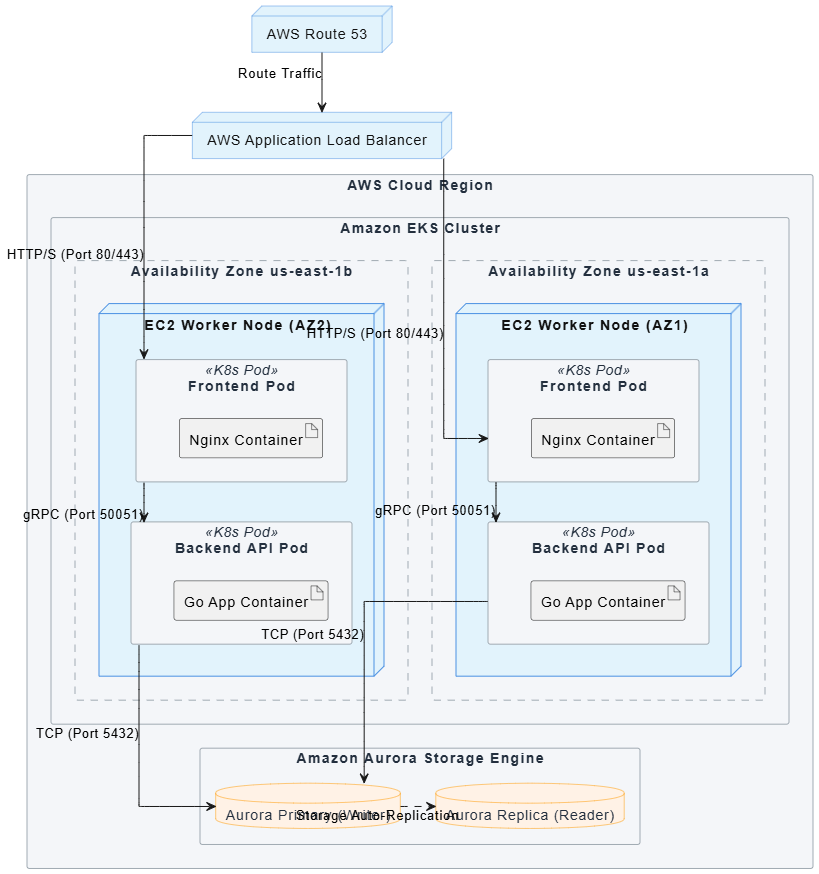
@startuml

skinparam shadowing false

skinparam defaultFontName "Arial"

skinparam linetype ortho

' Styling Defs

skinparam rectangle {

    BackgroundColor #F4F6F9

    BorderColor #A0AAB2

    FontColor #232F3E

}

skinparam node {

    BackgroundColor #E2F3FC

    BorderColor #4A90E2

    FontColor #111111

}

skinparam database {

    BackgroundColor #FFF2E6

    BorderColor #FF9900

    FontColor #232F3E

}

' Infrastructure Entry Point

node "AWS Route 53" as dns

node "AWS Application Load Balancer" as alb

dns --> alb : Route Traffic

' Global Cloud Perimeter

rectangle "AWS Cloud Region" {


    ' Cross-AZ Kubernetes Cluster Boundary

    rectangle "Amazon EKS Cluster" as eks {


        ' Availability Zone 1

        rectangle "Availability Zone us-east-1a" as az1 #line.dashed {

            node "EC2 Worker Node (AZ1)" as node1 {

                rectangle "Frontend Pod" as podWeb1 <<K8s Pod>> {

                    artifact "Nginx Container" as containerWeb1

                }

                rectangle "Backend API Pod" as podApi1 <<K8s Pod>> {

                    artifact "Go App Container" as containerApi1

                }

            }

        }

        ' Availability Zone 2

        rectangle "Availability Zone us-east-1b" as az2 #line.dashed {

            node "EC2 Worker Node (AZ2)" as node2 {

                rectangle "Frontend Pod" as podWeb2 <<K8s Pod>> {

                    artifact "Nginx Container" as containerWeb2

                }

                rectangle "Backend API Pod" as podApi2 <<K8s Pod>> {

                    artifact "Go App Container" as containerApi2

                }

            }

        }

    }

    ' Shared Database Tier

    rectangle "Amazon Aurora Storage Engine" as storage {

        database "Aurora Primary (Writer)" as dbMaster

        database "Aurora Replica (Reader)" as dbReplica

    }

}

' Routing & Traffic Matrix

alb --> podWeb1 : HTTP/S (Port 80/443)

alb --> podWeb2 : HTTP/S (Port 80/443)

podWeb1 --> podApi1 : gRPC (Port 50051)

podWeb2 --> podApi2 : gRPC (Port 50051)

podApi1 --> dbMaster : TCP (Port 5432)

podApi2 --> dbMaster : TCP (Port 5432)

dbMaster .right.> dbReplica : Storage Auto-Replication

@enduml
Example: Cloud-native Kubernetes deployment across AWS availability zones with load balancer routing, pod nesting, and shared database cluster. [[1]]
-
PlantUML Timing Diagram Syntax Guide: Visualize precise state durations and temporal constraints along linear timelines. Learn
robust/conciseparticipant styles,@timepointstate assignments,clockwaveform generation, and<->constraint annotations for embedded systems and protocol specification. [[30]]

@startuml
skinparam handwritten false
skinparam shadowing false
skinparam defaultFontName "Arial"

' Title of the timing diagram
title Data Bus Register Synchronization Timeline

' Define a periodic clock waveform (period 10 units, high 5 units)
clock "System Clock" as CLK with period 10 pulse 5

' Define the Data Bus robust participant
robust "Data Bus Register" as BUS

' Time 0: Initial state of the register
@0
BUS is Empty

' Time 10: Data bus shifts to Reading
@10
BUS is Reading

' Time 20: Data bus shifts to Writing
@20
BUS is Writing

' Time 22: Display the custom text label on the timeline
@22
note top of BUS : T_WRITE

' Time 30: Data bus becomes Locked
@30
BUS is Locked

' Time 35: Display the custom text label on the timeline
@35
note top of BUS : T_LOCK

' Time 40: Data bus returns to Empty
@40
BUS is Empty

' Add temporal constraint annotations using explicit numeric points
@22 <-> @35 : {13 TU Duration}

@enduml
Example: Concise timeline showing data bus register states (Empty → Reading → Writing → Locked) synchronized with a periodic system clock waveform. [[12]]
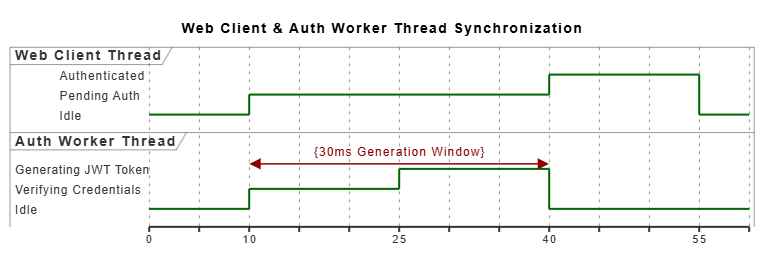
@startuml

skinparam shadowing false

skinparam defaultFontName "Arial"

' Title of the multi-thread timing diagram

title Web Client & Auth Worker Thread Synchronization

' Declare the timelines using the robust participant style

robust "Web Client Thread" as CLIENT

robust "Auth Worker Thread" as AUTH

' Time 0ms: Initial Idle States

@0

CLIENT is Idle

AUTH is Idle

' Time 10ms: Client triggers an authentication request

@10

CLIENT is "Pending Auth"

AUTH is "Verifying Credentials"

' Time 25ms: Client sends additional payload / Auth begins token generation

@25

AUTH is "Generating JWT Token"

' Time 40ms: Auth finishes token generation and responds to the client

@40

AUTH is Idle

CLIENT is "Authenticated"

' Time 55ms: Client returns to default state

@55

CLIENT is Idle

' 30ms Temporal Constraint Window Annotation (From @10 to @40)

@10 <-> @40 : {30ms Generation Window}

@enduml
Example: Robust multi-thread timeline mapping web client and auth worker states with a 30ms generation window constraint annotation. [[12]]
-
PlantUML ERD Syntax Guide: Design entity-relationship diagrams for database schema documentation. Master entity declarations, attribute typing, primary/foreign key notation, and cardinality relationships (
1|o--o{) for data modeling and SQL migration planning. -
PlantUML ArchiMate Diagram Syntax Guide: Model enterprise architecture layers using the ArchiMate specification. Learn business/application/technology layer elements, motivation concepts, and relationship types for strategic IT planning and governance documentation.
-
PlantUML C4 Model Syntax Guide: Implement the C4 model for software architecture visualization across four abstraction levels: Context, Container, Component, and Code. Master
Person,System,Container, andComponentstereotypes with boundary containers and relationship styling for stakeholder-aligned architecture communication.
Note on Embedded Diagrams: All PlantUML code examples in VPASCode documentation render as interactive, editable diagrams directly in the browser. The PNG image links above show static previews of example diagrams; for full interactivity including live editing, syntax validation, and export to PNG/SVG, visit each article URL directly at vpascode.com/docs. [[54]]
VPasCode Editor Features: Every article includes “Edit PlantUML in VPasCode” buttons that launch the code example in VPasCode’s free, browser-based editor—no login or installation required. Changes preview instantly with real-time rendering. [[54]]
Reference compiled from VPASCode documentation. VPasCode is a free, online, browser-based editor for PlantUML, Mermaid, and Graphviz diagrams that requires no login or installation. [[54]]

 English
 Arabic
 Chinese (Simplified)
 Dutch
Dutch French
 German
 Italian
 Japanese
 Korean
 Portuguese
 Russian
 Spanish