


Visual Paradigm’s custom AI endpoint support lets organizations choose which AI provider and model power selected Visual Paradigm AI features. Instead of relying exclusively on Visual Paradigm’s system-default model, an eligible workspace can route supported requests through an approved provider, a specific model, or—subject to evaluation—a custom or self-hosted AI service.
This capability is designed for organizations that need greater control over security, infrastructure, model selection, performance, cost, and usage policies.
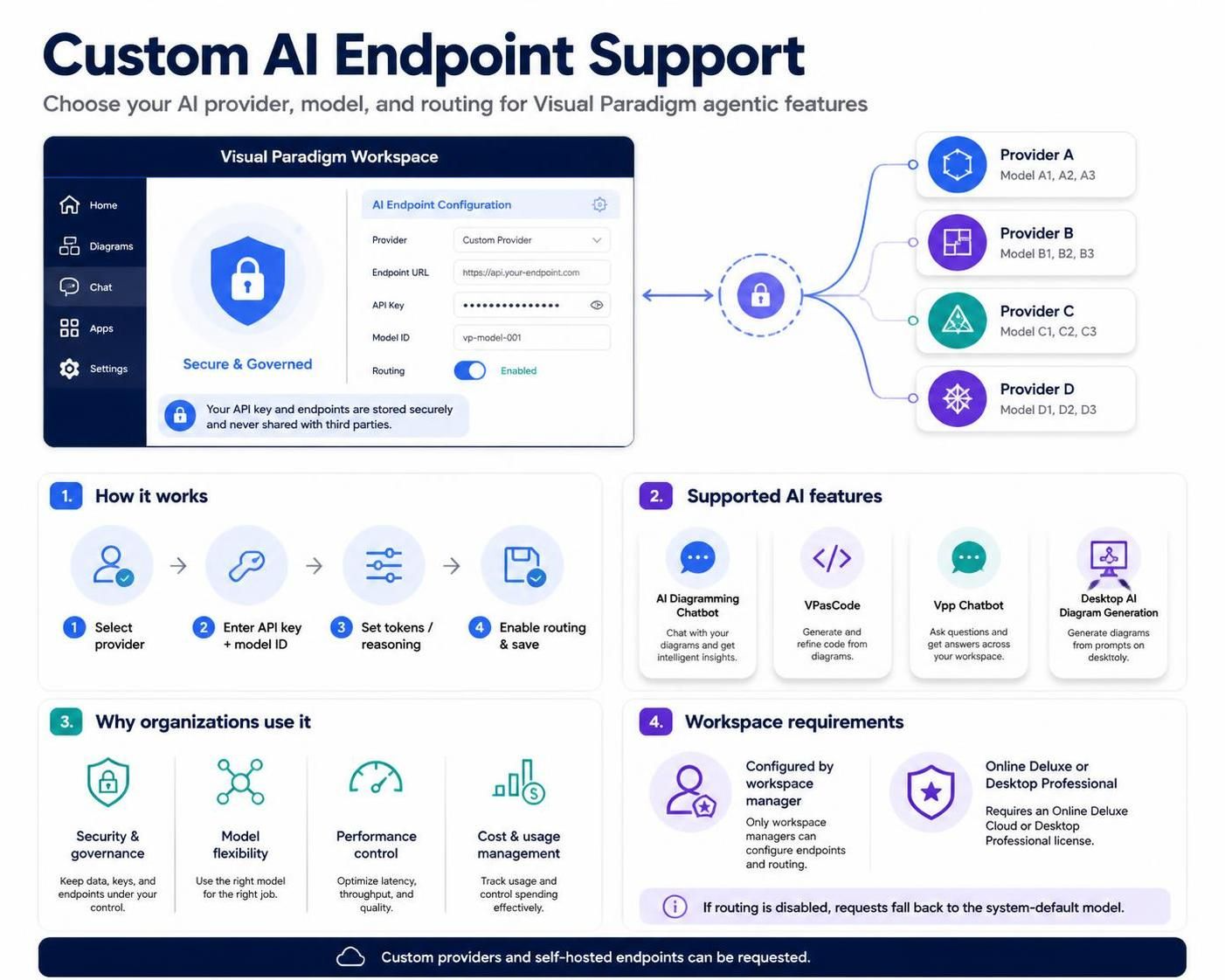
What Is a Custom AI Endpoint?
A custom AI endpoint is an organization-selected connection through which Visual Paradigm sends supported AI requests.
The workspace manager can configure:
-
An AI provider
-
An API key
-
A model ID
-
The maximum output-token limit
-
Reasoning or thinking settings, where supported
-
Whether requests should be routed through the configuration
When routing is enabled, the configuration applies across the workspace for the supported Visual Paradigm applications and features.
If routing is not enabled, supported requests continue to use Visual Paradigm’s system-default model.
Why Use a Custom AI Endpoint?
Different organizations have different requirements for how AI services should be selected, managed, and monitored. Custom endpoint support helps align Visual Paradigm’s AI workflows with those requirements.
Security and governance
Organizations can use an AI provider and account approved by their security, compliance, or IT teams. This can make it easier to apply internal policies for credentials, access control, and provider usage.
Infrastructure control
Teams can manage provider relationships, API keys, quotas, access policies, and usage monitoring through their own preferred setup.
Model flexibility
A team can select a model based on factors such as:
-
Response quality
-
Speed
-
Reasoning capability
-
Language support
-
Cost
-
Workload requirements
-
Output length
-
Provider availability
Performance optimization
The organization can choose a provider or model that performs well for its region, network environment, expected request volume, and application workload.
Operational consistency
Because the configuration applies at the workspace level, users do not need to configure AI services individually. A workspace manager can establish a shared configuration for eligible users.
Cost and usage management
Using an organization-managed provider account can help teams apply their own budgeting, quota, rate-limit, and usage-monitoring policies.
Enterprise alignment
Custom endpoints can help organizations align Visual Paradigm’s supported AI features with internal technology standards, regulatory requirements, infrastructure decisions, and vendor policies.
Supported Visual Paradigm Features
Custom endpoints currently apply to the following applications and AI features.
| Application or feature | Supported capabilities |
|---|---|
| Visual Paradigm AI Diagramming Chatbot | AI-assisted diagramming conversations and related diagram workflows |
| Visual Paradigm VPasCode | AI diagram generation, diagram modification, code error fixing, code translation, and C4 diagram importing |
| Visual Paradigm Vpp Chatbot | AI-assisted interactions through the Vpp Chatbot |
| Visual Paradigm Desktop AI Diagram Generation | AI-generated diagrams in the desktop application |
Custom endpoint support does not automatically apply to every AI-powered feature in Visual Paradigm. Features outside this list continue to use their existing AI configuration unless Visual Paradigm provides additional support.
Supported AI Providers
The configuration page can provide a list of supported providers. The post identifies the following providers:
-
Anthropic
-
Cohere
-
DeepSeek
-
Google
-
Groq
-
MiniMax
-
Mistral
-
Moonshot
-
OpenAI
-
OpenRouter
-
Qwen
-
Tencent
-
xAI
-
Z.ai, including GLM
-
Zhipu Big Model
The exact models available depend on the selected provider and the model identifier entered during configuration.
What You Need Before Configuring the Endpoint
Before opening the configuration page, prepare the following:
-
An approved AI provider
Decide which provider your organization will use. -
A valid API key
Obtain an API key from the selected provider and make sure it has the necessary permissions and usage limits. -
A model ID
Identify the exact model name or identifier expected by the provider. -
A workspace-manager account
Only the workspace manager can create or update the shared configuration. -
An eligible Visual Paradigm license
Users need Visual Paradigm Online Deluxe Edition or higher, or Visual Paradigm Desktop Professional Edition or higher. -
Internal approval, where applicable
Organizations may want their IT, security, procurement, or compliance teams to approve the provider and model before deployment.
How to Configure a Custom AI Endpoint
The configuration is performed from the LLM configuration page in a supported Visual Paradigm application.
Step 1: Open the LLM configuration page
From a supported Visual Paradigm application, open the LLM configuration interface.
The exact navigation may vary depending on the application and version, but the configuration page is where the provider, model, endpoint behavior, and model settings are managed.
Step 2: Select a provider
Choose an existing provider from the provider list.
If your provider is listed, select it and continue with the connection settings. If the provider is not listed, select Custom to request support for a custom provider or endpoint.
Step 3: Enter the API key
Enter the API key associated with the selected provider.
Use an API key created specifically for the organization or workspace where possible. Before saving, confirm that:
-
The key is active
-
The key has access to the selected model
-
The provider account has sufficient quota
-
Any organizational restrictions allow the intended use
-
The key has not expired or been revoked
Step 4: Enter the model ID
Enter the identifier of the model you want Visual Paradigm to use.
The model ID must match the provider’s expected identifier. A display name that looks correct may not be sufficient if the provider requires a specific technical model name.
Step 5: Configure maximum output tokens
The Max output tokens setting controls the maximum amount of text the model can generate.
A higher value may be useful for:
-
Longer chatbot conversations
-
Complex diagram-generation requests
-
Detailed explanations
-
Large code or model transformations
A lower value may be appropriate when:
-
The provider or model has a smaller output limit
-
Shorter responses are preferred
-
Usage must be controlled
-
Response speed and cost are priorities
The suitable value depends on the selected model and the expected workload.
Step 6: Configure reasoning or thinking behavior
Some providers and models expose a reasoning-effort or thinking-mode setting.
Where available, this setting can influence how much effort the model applies before generating its answer. Higher reasoning settings may be useful for complex tasks, while lower settings may provide faster responses for straightforward operations.
The available options depend on the selected provider and model. Provider defaults apply when no custom value is selected.
Step 7: Enable request routing
Enable:
Route requests through this configuration
This step is essential. Entering provider information without enabling routing does not activate the custom endpoint for supported requests.
If routing remains disabled, Visual Paradigm uses its system-default model for supported AI requests.
Step 8: Save the configuration
Click Save changes.
The configuration then becomes effective at the workspace level for the supported applications and features.
Workspace-Level Behavior
Custom endpoint configuration is not an individual-user preference. It is a workspace-level setting.
Only the workspace manager can:
-
Create the configuration
-
Change the provider
-
Replace the API key
-
Change the model
-
Adjust output or reasoning settings
-
Enable or disable routing
-
Delete the configuration
Once configured, the setting applies to the workspace’s supported AI functionality. Individual users generally do not configure separate providers for the same workspace-level setup.
Licensing Requirements
The post specifies these minimum licensing requirements:
-
Visual Paradigm Online Deluxe Edition or higher
-
Visual Paradigm Desktop Professional Edition or higher
Every user who wants to use the relevant AI functionality must have a qualifying license. Configuring a custom endpoint does not grant access to users whose licenses do not meet the requirements.
If a user cannot access a supported feature, the workspace manager should check:
-
Whether the workspace has a custom endpoint configured
-
Whether request routing is enabled
-
Whether the user has an eligible license
-
Whether the provider API key is valid
-
Whether the selected model is available
-
Whether the provider account has remaining quota
Using a Custom or Self-Hosted Provider
If the desired provider is not in the supported provider list, select Custom.
This opens the Request Custom Provider dialog. The organization can submit information about its requirements so Visual Paradigm can evaluate, test, optimize, and prepare a validated configuration.
Custom-provider requests may be relevant when an organization wants to:
-
Use a self-hosted AI model
-
Connect to an internally managed AI service
-
Use a model not currently listed
-
Apply a private infrastructure arrangement
-
Integrate a provider with a specialized API
-
Extend custom-model support to additional Visual Paradigm AI features
Custom support is subject to technical evaluation and quality assurance. The organization may need to provide details about the model, hosting arrangement, provider, integration method, and target Visual Paradigm features.
Choosing a Model
The post divides several models into general performance categories based on Visual Paradigm’s internal testing.
Models recommended for fast, everyday operations
The post identifies these models as comparatively fast while providing acceptable quality for routine use:
-
MiniMax-M2.7-highspeed
-
gpt-5.6-luna
-
gpt-5.6-sol
-
gpt-5.6-terra
-
claude-sonnet-4-6
-
gemini-3.6-flash
-
gemini-3.7-flash
-
glm-5.3
-
glm-5.3-flash
-
qwen3.8-max
-
qwen3.8-flash
-
deepseek-v4-flash-0731
-
mistral-medium-3-5
-
mistral-large-2407
-
grok-4.6
Models with longer generation times during testing
The post reports longer generation times for:
-
MiniMax-M2.7
-
MiniMax-M3
-
claude-opus-4-6-thinking
-
glm-5.2
-
kimi-k3
These classifications are guidance rather than guarantees. Actual response time can vary because of:
-
Network routing
-
Provider infrastructure
-
Server load
-
Rate limits
-
Model availability
-
Request complexity
-
Output-token settings
-
Regional provider performance
A model that is fast in one environment may be slower in another. Organizations should test candidate models against their own diagrams, code, chatbot prompts, and usage volumes.
Recommended Model-Selection Strategy
A practical selection process is to evaluate models against the work your team actually performs.
For routine diagramming
Prioritize:
-
Fast response time
-
Reliable diagram interpretation
-
Sufficient output length
-
Consistent formatting
For complex reasoning
Prioritize:
-
Reasoning quality
-
Thinking-mode support
-
Ability to handle long prompts
-
Accuracy in diagram modifications and transformations
For code-related VPasCode tasks
Evaluate:
-
Code generation quality
-
Error diagnosis
-
Code translation accuracy
-
Ability to preserve diagram and code relationships
-
Support for the required programming languages
For high-volume workspaces
Prioritize:
-
Provider quotas
-
Rate limits
-
Cost controls
-
Regional availability
-
Monitoring and reporting
-
Predictable latency
For controlled enterprise environments
Prioritize:
-
Approved provider status
-
Access policies
-
Key-management procedures
-
Data-handling requirements
-
Self-hosted or private deployment options
-
Administrative ownership
Removing a Custom Endpoint
To remove the workspace-level configuration:
-
Open the LLM configuration page.
-
Go to the Danger Zone section.
-
Select Delete configuration.
-
Confirm the deletion if prompted.
Deleting the configuration removes the custom endpoint for the entire workspace.
After deletion, supported requests immediately fall back to Visual Paradigm’s system-default model. Removing the configuration does not mean that users can continue using the deleted provider configuration independently.
Troubleshooting Guide
The custom model is not being used
Check whether Route requests through this configuration is enabled. If routing is disabled, Visual Paradigm falls back to the system-default model.
Users cannot access the AI features
Confirm that each affected user has one of the required licenses:
-
Online Deluxe Edition or higher
-
Desktop Professional Edition or higher
Also verify that the user is working in the correct workspace.
Requests fail immediately
Check:
-
The API key
-
The model ID
-
Provider availability
-
Account quota
-
Rate limits
-
Network access
-
Whether the selected model is available to the account
Responses are too short
Increase the maximum output-token limit if the provider and model support a higher value. Also verify that the model itself has an adequate output limit.
Responses are too slow
Consider:
-
Using one of the models identified as faster for everyday operations
-
Lowering reasoning or thinking effort where appropriate
-
Reducing unnecessary prompt complexity
-
Checking provider load and rate limits
-
Testing another provider
-
Confirming that network routing is not introducing excessive latency
A custom provider is unavailable
Select Custom and submit the Request Custom Provider form. Visual Paradigm needs to evaluate and validate providers that are not already supported.
Some AI features still use their previous configuration
Custom endpoints currently apply only to the supported applications and features listed in the announcement. Other AI features may continue using their existing configuration.
Administrator Deployment Checklist
Use this checklist when rolling out a custom endpoint across an organization:
-
Confirm that the organization has an approved AI provider.
-
Select an appropriate model.
-
Obtain an API key with suitable permissions.
-
Confirm provider quota and rate limits.
-
Verify that the model ID is correct.
-
Decide on a maximum output-token value.
-
Configure reasoning or thinking behavior if available.
-
Confirm that the workspace manager is performing the setup.
-
Verify user license eligibility.
-
Enable Route requests through this configuration.
-
Save the configuration.
-
Test the AI Diagramming Chatbot.
-
Test relevant VPasCode features.
-
Test the Vpp Chatbot.
-
Test Desktop AI Diagram Generation where applicable.
-
Monitor response quality, speed, failures, and usage.
-
Document the provider, model, key ownership, and change process.
-
Establish a procedure for rotating or revoking the API key.
-
Decide what to do if the provider becomes unavailable.
Key Takeaways
Visual Paradigm’s custom AI endpoint support gives eligible workspaces more control over the AI services used by selected agentic features. A workspace manager can choose a supported provider, enter an API key and model ID, adjust model behavior, and route workspace requests through that configuration.
The most important operational points are:
-
The configuration applies at the workspace level.
-
Only the workspace manager can configure it.
-
Request routing must be explicitly enabled.
-
Users need Online Deluxe or Desktop Professional licensing, or higher.
-
Support currently covers selected AI features rather than every Visual Paradigm AI capability.
-
Unsupported providers can be submitted through the Custom Provider request process.
-
Deleting the configuration causes requests to fall back to Visual Paradigm’s system-default model.
-
Model performance depends on the provider, network, workload, model settings, and current service conditions.
For organizations that need consistent AI administration, model flexibility, and control over provider selection, custom endpoint support provides a centralized way to integrate Visual Paradigm’s supported AI workflows with existing technology and governance practices.

 English
 Arabic
 Chinese (Simplified)
 Dutch
Dutch French
 German
 Italian
 Japanese
 Korean
 Portuguese
 Russian
 Spanish