


Introduction
In today’s rapidly evolving software development landscape, the ability to clearly visualize, communicate, and document system architecture is paramount to project success. As systems grow in complexity, teams require robust tools that bridge the gap between conceptual design and technical implementation. This case study explores how Visual Paradigm, a leading Unified Modeling Language (UML) solution, empowers software professionals to create precise, scalable, and collaborative class diagrams that serve as the backbone of object-oriented system design.
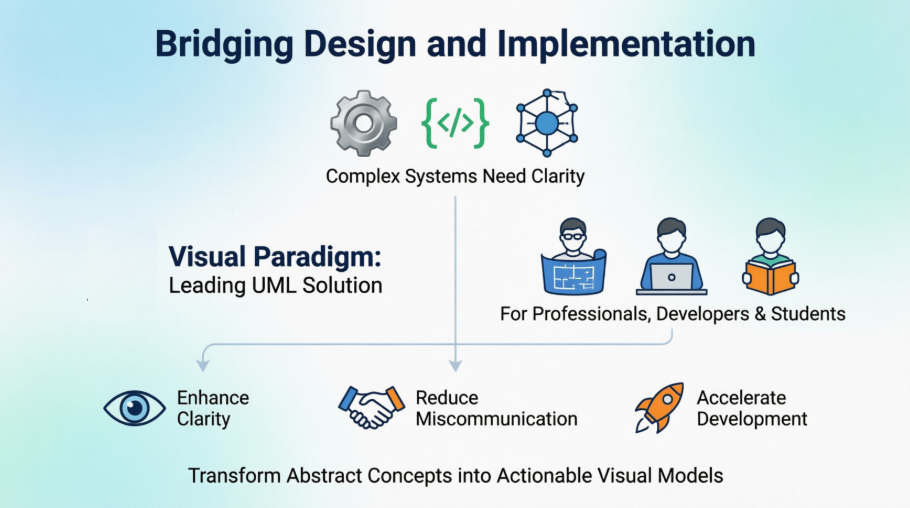
Through a practical, step-by-step examination, we demonstrate how Visual Paradigm transforms abstract architectural concepts into actionable visual models. Whether you are a seasoned architect, a developing engineer, or a student mastering software design principles, this case study provides a comprehensive roadmap for leveraging Visual Paradigm’s capabilities to enhance clarity, reduce miscommunication, and accelerate development cycles. By the end of this exploration, you will understand not only how to create class diagrams but also how to integrate them effectively into your software engineering workflow for maximum impact.
Understanding Class Diagrams: The Foundation of Object-Oriented Design
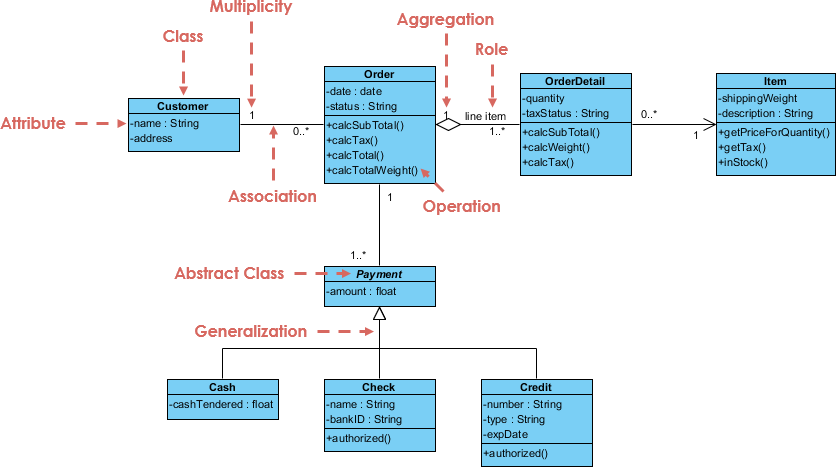
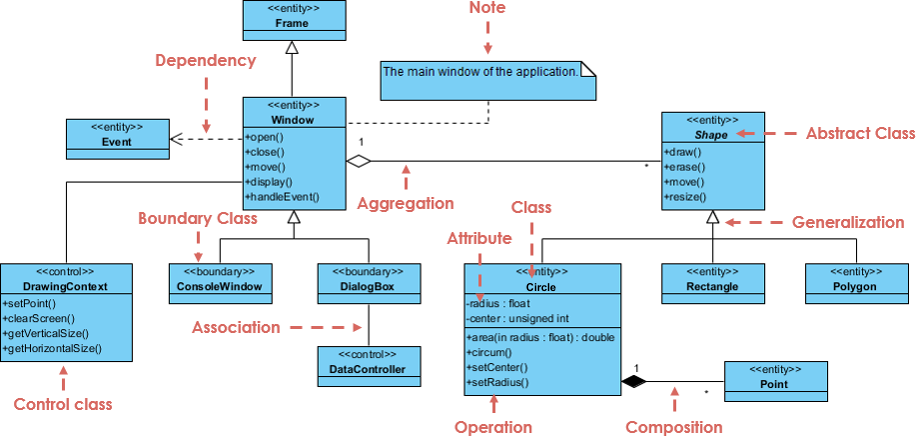
A Class Diagram is a type of UML diagram that describes the structure of a system by showing its classes, their attributes, operations (methods), and the relationships among the classes. Class diagrams are essential for object-oriented design and help in visualizing the system’s architecture.
Key Components of Class Diagrams
-
Classes: Represented as rectangles divided into three sections: the top section contains the class name, the middle section contains attributes, and the bottom section contains methods.
-
Attributes: Characteristics or properties of a class, usually represented as a list within the class rectangle.
-
Methods: Functions or operations that can be performed by the class, also listed within the class rectangle.
-
Relationships: Lines connecting classes that represent associations, dependencies, generalizations, and aggregations.
Practical Implementation: Building a Class Diagram in Visual Paradigm
Visual Paradigm provides an intuitive interface for creating class diagrams. Here’s a step-by-step guide to help you get started:
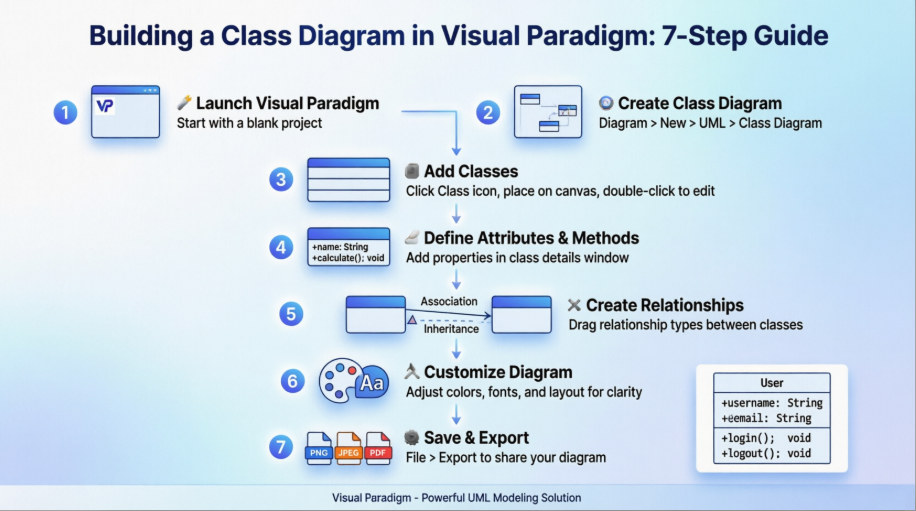
Step 1: Launch Visual Paradigm
Open Visual Paradigm and create a new project by selecting “Start with a blank project.”
Step 2: Create a New Class Diagram
-
In the main menu, select Diagram > New > UML > Class Diagram.
-
A new class diagram canvas will open, ready for you to start modeling.
Step 3: Add Classes
-
Click on the Class icon in the toolbar.
-
Click on the canvas to place a new class.
-
Double-click the class to edit its name, attributes, and methods.
Step 4: Define Attributes and Methods
-
In the class details window, add attributes by typing them in the attributes section.
-
Similarly, add methods in the methods section.
Step 5: Create Relationships
-
To create relationships between classes, select the appropriate relationship type from the toolbar (e.g., association, inheritance).
-
Click and drag from one class to another to establish the relationship.
Step 6: Customize Your Diagram
Visual Paradigm allows you to customize your class diagram by changing colors, fonts, and layout. Use the formatting options in the toolbar to enhance the visual appeal of your diagram.
Step 7: Save and Export Your Diagram
Once you are satisfied with your class diagram, save your project. You can also export your diagram in various formats, such as PNG, JPEG, or PDF, by selecting File > Export.
Visual Paradigm: A Comprehensive Modeling Ecosystem
In the dynamic world of software development, having a powerful and user-friendly UML modeling tool is crucial for designing, communicating, and documenting complex systems. Among the leading options in the market, Visual Paradigm stands out as a comprehensive and versatile solution that caters to the needs of professionals, students, and hobbyists alike.
Visual Paradigm is a robust UML modeling tool that offers a wide range of features to support the entire software development lifecycle. From creating UML diagrams to reverse engineering code, the tool provides a seamless and intuitive user experience. One of the standout features of Visual Paradigm is its support for the latest version of UML (2.6), ensuring that users have access to the most up-to-date modeling capabilities.
Visual Paradigm Desktop is the company’s flagship offering, providing a comprehensive suite of UML diagramming tools, including class diagrams, use case diagrams, sequence diagrams, and more. These diagrams serve as a visual blueprint for understanding and communicating complex software systems, making them invaluable for project planning, analysis, and documentation.
Beyond UML, Visual Paradigm also supports a range of other diagramming notations, such as BPMN, Data Flow Diagrams, and Organizational Charts. This versatility allows users to create a diverse set of diagrams to visualize and analyze various aspects of their projects, from business processes to system architecture.
One of the key advantages of Visual Paradigm is its user-friendly interface and intuitive tools. The software’s drag-and-drop functionality and rich set of formatting options make it easy for users to create professional-looking diagrams with minimal effort.
For those who prefer a free solution, Visual Paradigm offers the Community Edition, a feature-rich UML modeling tool that is available at no cost for non-commercial use. This edition includes support for all 13 UML 2.x diagrams, making it an excellent choice for students, hobbyists, and small teams.
The Visual Paradigm blog and online guides provide a wealth of resources for users to learn and master the tool’s capabilities. From comprehensive UML tutorials to practical examples, these resources ensure that users can quickly become proficient in UML modeling and leverage the full potential of Visual Paradigm.
Best Practices for Effective Class Diagram Modeling
-
Keep it Simple: Avoid cluttering the diagram with too many classes. Focus on the most important classes and their relationships.
-
Use Clear Naming Conventions: Use meaningful names for classes, attributes, and methods to enhance readability.
-
Show Relationships Clearly: Clearly indicate the type of relationships (e.g., inheritance, association) using appropriate UML notation.
-
Iterate and Refine: Treat your class diagram as a living document. Update it as requirements evolve and new insights emerge.
-
Collaborate Early: Share diagrams with stakeholders early in the design process to gather feedback and align expectations.
Conclusion
Class diagrams remain a cornerstone of effective software architecture, providing a shared visual language that bridges technical and non-technical stakeholders. Through this case study, we have demonstrated how Visual Paradigm transforms the theoretical principles of UML into a practical, accessible, and powerful modeling experience. From initial concept to final export, Visual Paradigm streamlines the creation of class diagrams while supporting collaboration, documentation, and iterative design.
Whether you are modeling a small application or architecting an enterprise-scale system, the disciplined use of class diagrams in Visual Paradigm enhances clarity, reduces ambiguity, and accelerates development. By embracing the tool’s comprehensive feature set, intuitive interface, and extensive learning resources, teams can elevate their design practices and deliver higher-quality software with greater confidence.
As software systems continue to grow in scope and complexity, the ability to model, communicate, and refine architecture visually will only become more critical. Visual Paradigm stands ready to support that journey—empowering developers, architects, and designers to turn vision into structure, and structure into success.
References
- Getting Started with Visual Paradigm for UML: A beginner-friendly tutorial that walks users through the initial setup, interface navigation, and fundamental workflows for creating UML diagrams in Visual Paradigm.
- Class Diagrams in Visual Paradigm: A focused guide detailing how to construct, customize, and manage class diagrams using Visual Paradigm’s dedicated tools and features.
- UML Class Diagram Tutorial: A comprehensive educational resource from Tutorialspoint covering UML class diagram fundamentals, notation standards, and practical modeling examples.
- Class Diagrams in Visual Paradigm: A Comprehensive Guide: An in-depth official guide from Visual Paradigm explaining the purpose, components, and best practices for creating effective class diagrams within the platform.

 English
 Arabic
 Chinese (Simplified)
 Dutch
Dutch French
 German
 Italian
 Japanese
 Korean
 Portuguese
 Russian
 Spanish