


Introduction
Technical documentation and system architecture visualization have long faced a dichotomy: use visual tools that are difficult to version control, or use text-based scripts that require steep learning curves and manual syntax management. Visual Paradigm’s VPasCode resolves this conflict by offering a cloud-native, browser-based Diagram-as-Code (DaC) platform. By unifying industry-standard syntax engines with advanced artificial intelligence, VPasCode transforms how engineers and architects create technical diagrams.
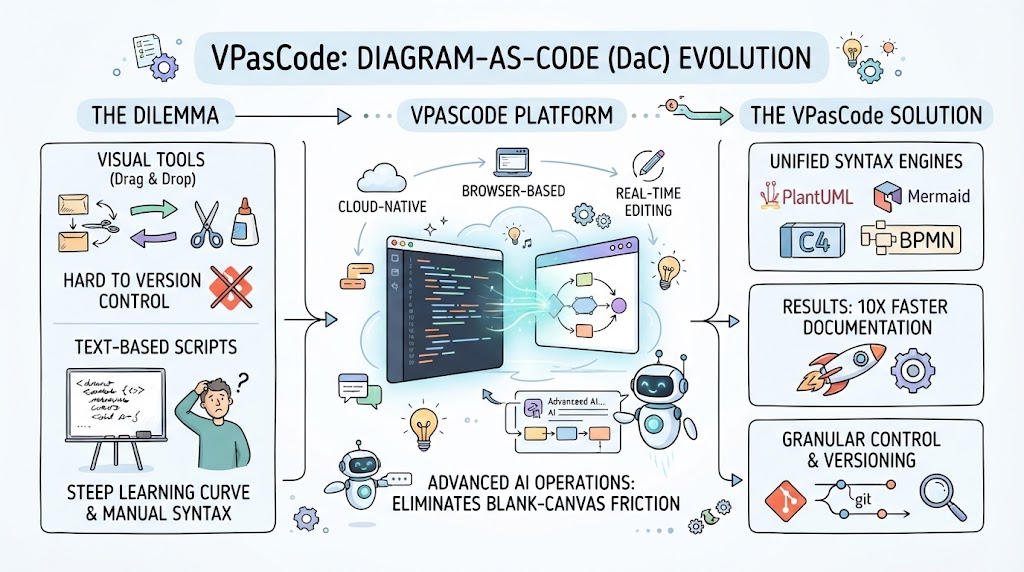
This comprehensive guide explores the VPasCode ecosystem, detailing its multi-engine support, real-time editing capabilities, and revolutionary AI operations that eliminate blank-canvas friction. Whether you are generating complex enterprise architectures or iterating on user flows, this guide will demonstrate how to leverage VPasCode for 10x documentation speed without sacrificing granular control.
Key Concepts and Examples
Before diving into workflows, it is essential to understand the core pillars that define the VPasCode experience:
-
Multi-Engine DaC: A unified workspace supporting PlantUML, Mermaid.js, and Graphviz, preventing vendor lock-in and allowing users to choose the best syntax for their specific diagram type.
-
Conversational AI Generation: The ability to bypass syntax memorization entirely by using natural language prompts to generate complete, editable DSL scripts instantly.
-
Interactive AI Modification: An iterative refinement process where users can instruct the AI to refactor, expand, or convert existing code using plain English commands.
-
Real-Time Dual-Panel Editing: A zero-configuration browser environment featuring a side-by-side code editor and live rendering canvas for immediate visual feedback.
-
Transparent Version Control: Because outputs are standard text code, all diagrams integrate seamlessly with Git repositories and support visual diffing for safe iteration.
Multi-Engine Diagram-as-Code Support
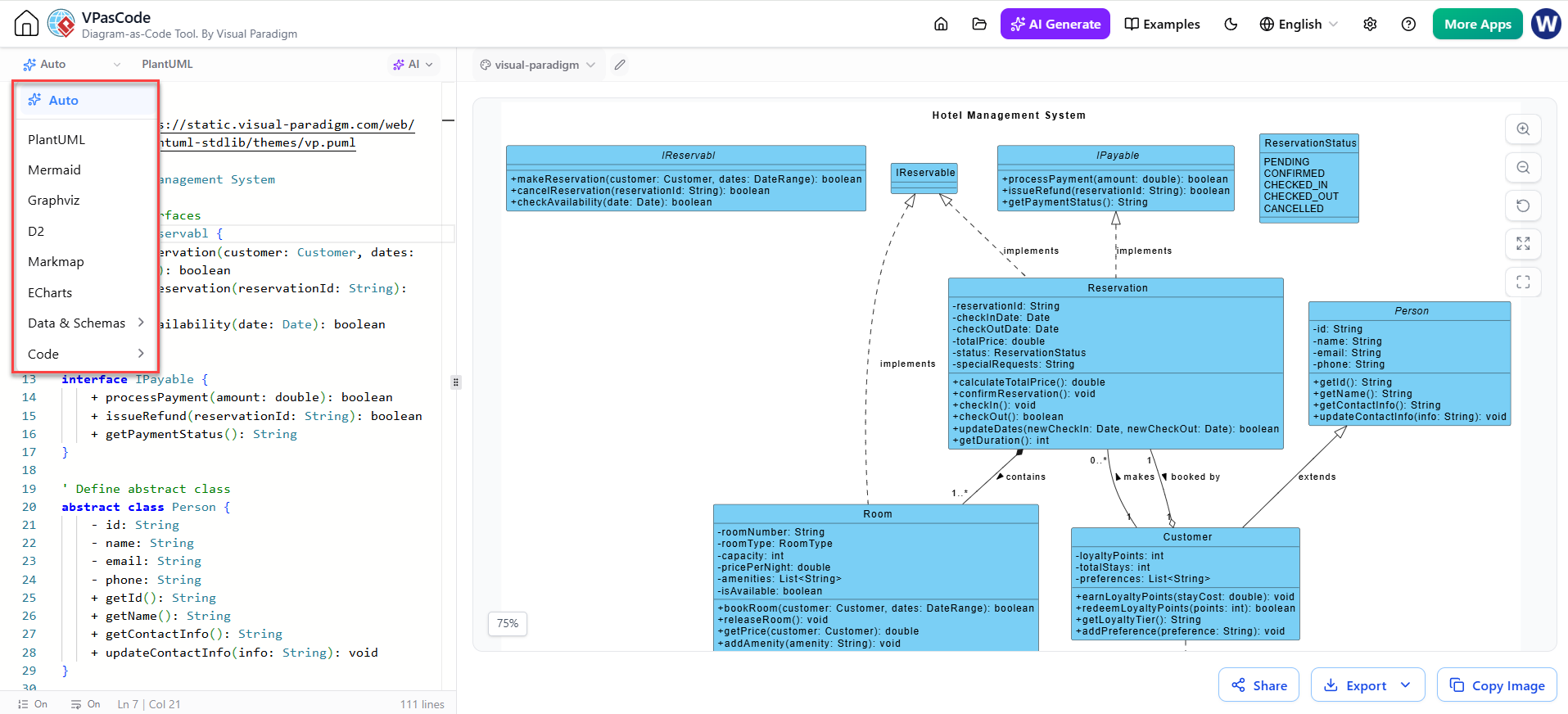
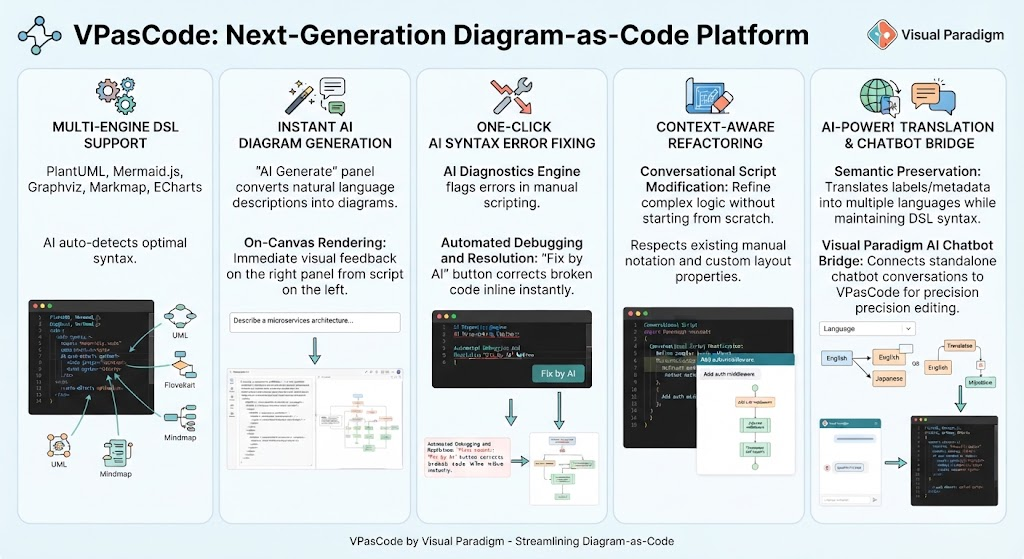
VPasCode distinguishes itself by refusing to lock users into a single proprietary framework. Instead, it provides a centralized workspace that supports three leading open-source text syntax standards, each optimized for different use cases:
-
PlantUML: The industry standard for robust enterprise software architecture. It excels at creating detailed class models, sequence workflows, component diagrams, and C4 architecture views.
-
Mermaid.js: Optimized for markdown-inspired charts. This engine is ideal for user flows, timelines, mind maps, and Gantt charts that need to be embedded directly into documentation platforms.
-
Graphviz (DOT): Geared toward massive network graphs and data structure visualizations where automatic layout algorithms are necessary to handle high node counts.
By supporting these open formats, VPasCode ensures that your intellectual property remains portable. You can copy raw text directly into Git repositories for effortless version control or export final assets as scalable vector files (SVG), high-resolution images (PNG), or printable documents (PDF). Furthermore, layouts generated in VPasCode can be seamlessly imported into Visual Paradigm Desktop or VP Online for advanced model-based editing.
Real-Time Dual-Panel Editor
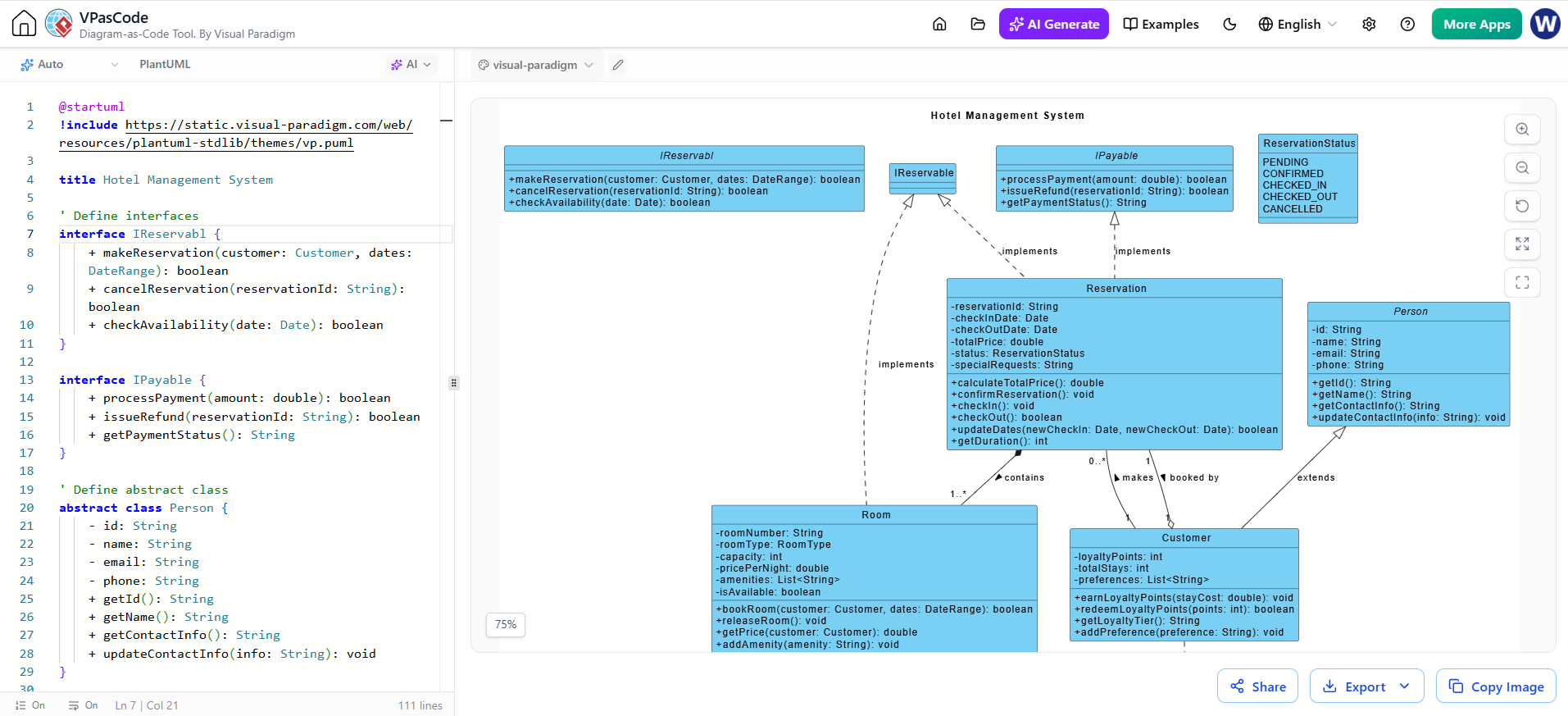
The platform operates entirely in the browser with zero local configuration required. The user interface utilizes a two-column configuration designed for maximum productivity:
-
Left Panel: A dedicated code editor where users write or modify their DSL scripts.
-
Right Panel: A high-performance rendering engine that updates the interactive canvas in real time as you type.
This immediate feedback loop eliminates the “save-and-refresh” cycle common in older tools, allowing for rapid experimentation and precise visual tuning.
Revolutionary AI Operations
While auxiliary AI capabilities like syntax error fixing are convenient, true productivity stems from eliminating initial friction and making iterations effortless. VPasCode introduces two game-changing AI operations that transform the diagramming workflow.
1. Instant AI Diagram Generation
Creating complex scripts from scratch is time-consuming, especially when learning new domain-specific syntax. The AI Generate feature allows you to produce complete diagram scripts from plain English prompts in seconds.
How it works:
-
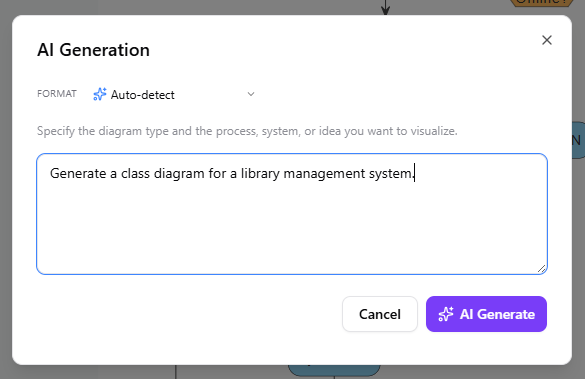
At the top toolbar of the editor, click the AI Generate button to open the AI Generation dialog box.

-
Select Format (Optional): By default, the format is set to Auto-detect.
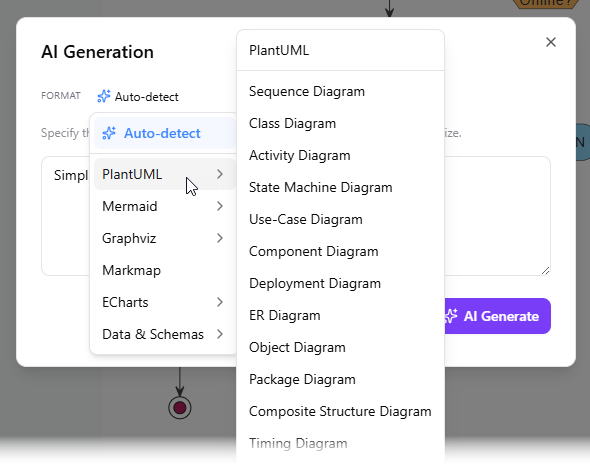
If you already know your desired format, you can select specific options from the dropdown, including PlantUML, Mermaid, Graphviz, Markmap, ECharts, and various Data & Schema formats. -
Describe Your Idea: In the text area, specify the system, process, or concept you want to visualize. For example, “Generate a class diagram for a library management system.”
-
Click AI Generate. VPasCode will write the exact DSL script and render the live visual model immediately inside the code editor.
2. Interactive AI Diagram Code Modification
Software architecture is constantly evolving. Editing text scripts line-by-line to insert new branches or refactor relationships can be tedious. VPasCode lets you instruct AI to modify existing code directly within the editor using natural language.
How it works:
-
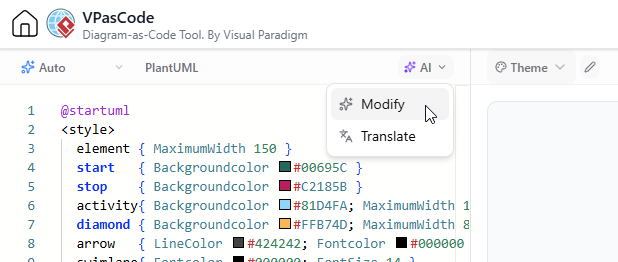
Above the code editor on the left panel, click the AI button and choose Modify.
-
Type your refactoring instruction in natural language. Examples include:
-
“Simplify this sequence diagram by grouping the database operations.”
-
“Add an alternate payment failure branch to this flowchart.”
-
“Convert this standard class diagram into a C4 container model.”
-
-
Click AI Modify. Your script updates automatically.
-
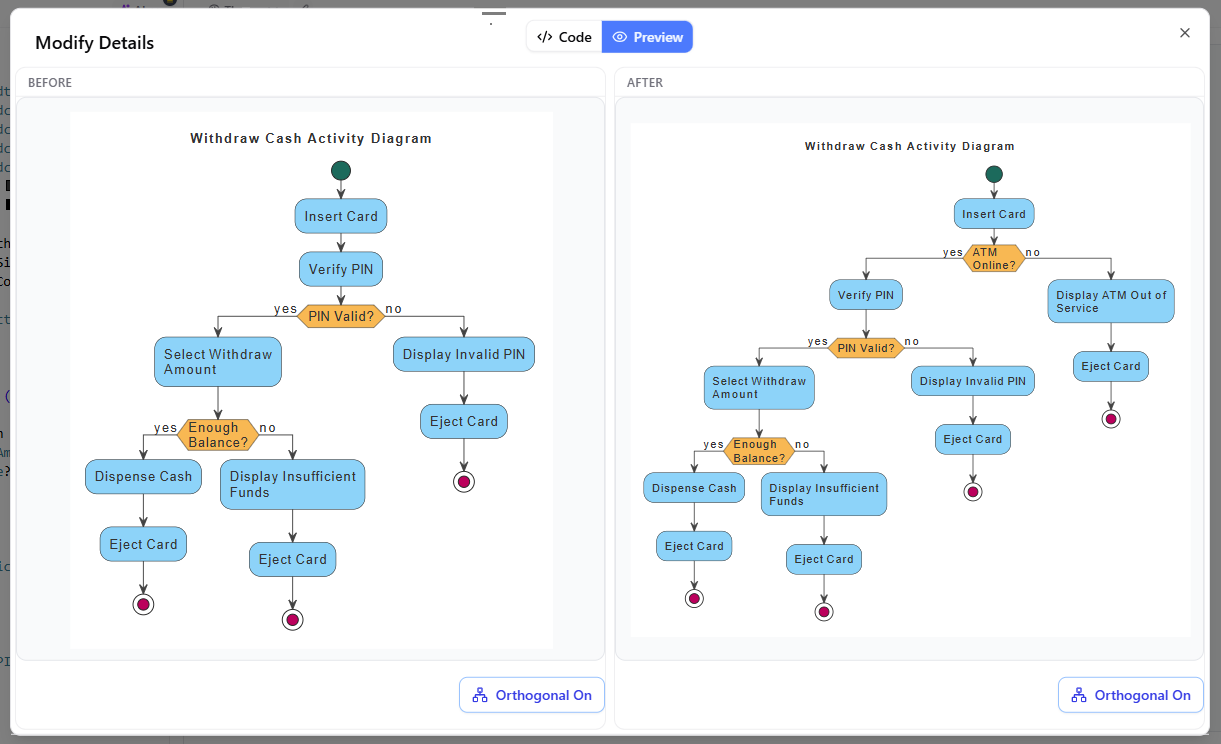
Optionally, click View Details to launch a side-by-side code diff window. You can inspect exact line-by-line changes alongside a comparative visual preview before finalizing your changes.
Why These Features Matter for Technical Teams
Traditional visual modeling tools often force engineers to waste hours aligning boxes manually, while pure text-to-diagram engines require memorizing distinct syntax rules. VPasCode bridges this gap by integrating conversational AI into a flexible diagram-as-code editor.
-
10x Documentation Speed: Go from a raw concept discussed in a meeting to a fully formatted architecture diagram in under 30 seconds.
-
Zero Syntax Friction: Whether you need an AI PlantUML tool or a quick Mermaid mind map, you do not need to consult external documentation. Simply tell the AI what you want.
-
Total Granular Control: Unlike black-box image generators, VPasCode generates clean, fully editable text code. You retain complete ownership to tweak, version-control, or export your models anywhere.
-
Safe & Transparent Iteration: The built-in visual code diff tool ensures you always know what changed, keeping your technical docs precise and maintainable.
Conclusion
VPasCode represents a significant evolution in technical visualization. By combining the portability and version-control benefits of Diagram-as-Code with the accessibility of conversational AI, it empowers teams to document systems faster and more accurately. The dual-panel editor ensures transparency, while the multi-engine support guarantees that users are never locked into a single ecosystem. For engineering teams looking to modernize their documentation workflow, VPasCode offers a powerful, future-proof solution that turns natural language into professional-grade technical artifacts instantly.
Recommended Resources on Visual Paradigm
- Comprehensive Guide to VPasCode by Visual Paradigm: An in-depth walkthrough covering setup, multi-engine support, and core DaC features.
- Mastering VPasCode: The Ultimate Guide to AI-Powered Diagram-as-Code: Advanced tutorial focusing on leveraging AI generation and modification for complex architectures.
- Introducing VPasCode: The Ultimate Unified Text-to-Diagram Platform: Official release announcement detailing the platform’s multi-engine capabilities and cloud-native design.
- Text-to-Diagram Generation with AI Chatbot: Specific guide on using natural language processing to create diagrams without manual coding.
- Never Get Stuck on Syntax Again: AI Code Error Fixing in VPasCode: Overview of the intelligent diagnostics feature that identifies and fixes syntax bugs automatically.
- Visual Paradigm AI: The Ultimate Guide to Intelligent Modeling: Broader context on how AI integrates across the Visual Paradigm ecosystem for enterprise modeling.
- The Ultimate Text-Based UML Tool: How VPasCode is Redefining DaC: Industry perspective on the shift toward AI-enhanced text-based diagramming in 2026.
Related posts:
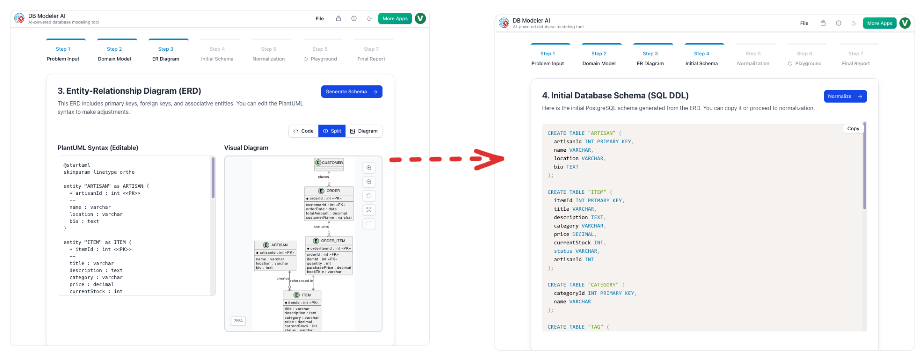 From Static Diagrams to Living Knowledge: A Case Study on Visual Paradigm’s Unified AI-Driven Documentation Ecosystem
 From Zero to Data Visualization Mastery: A Beginner’s Guide to AI-Powered Chart Creation with VPasCode and ECharts
 VPasCode Release: Free Diagram-as-Code & Premium AI Features Explained
 Mastering AI-Native Diagramming: A Comprehensive Guide to Visual Paradigm’s VPasCode

 English
 Arabic
 Chinese (Simplified)
 Dutch
Dutch French
 German
 Italian
 Japanese
 Korean
 Portuguese
 Russian
 Spanish