


Robotics engineers often begin the architecture of autonomous systems with a sense of confidence. A Finite State Machine (FSM) or a UML State Machine Diagram seems like the perfect blueprint for control logic. It is clean, visual, and deterministic on paper. However, when these diagrams are translated into actual code running on physical hardware, the results are frequently disappointing. Systems stall, unexpected transitions occur, and debugging becomes a nightmare. The disconnect lies not in the design philosophy itself, but in the assumptions made about the environment and the execution platform. This guide explores the specific technical reasons why standard state machine diagrams struggle in real-world robotics and how to adjust your approach for robust deployment.
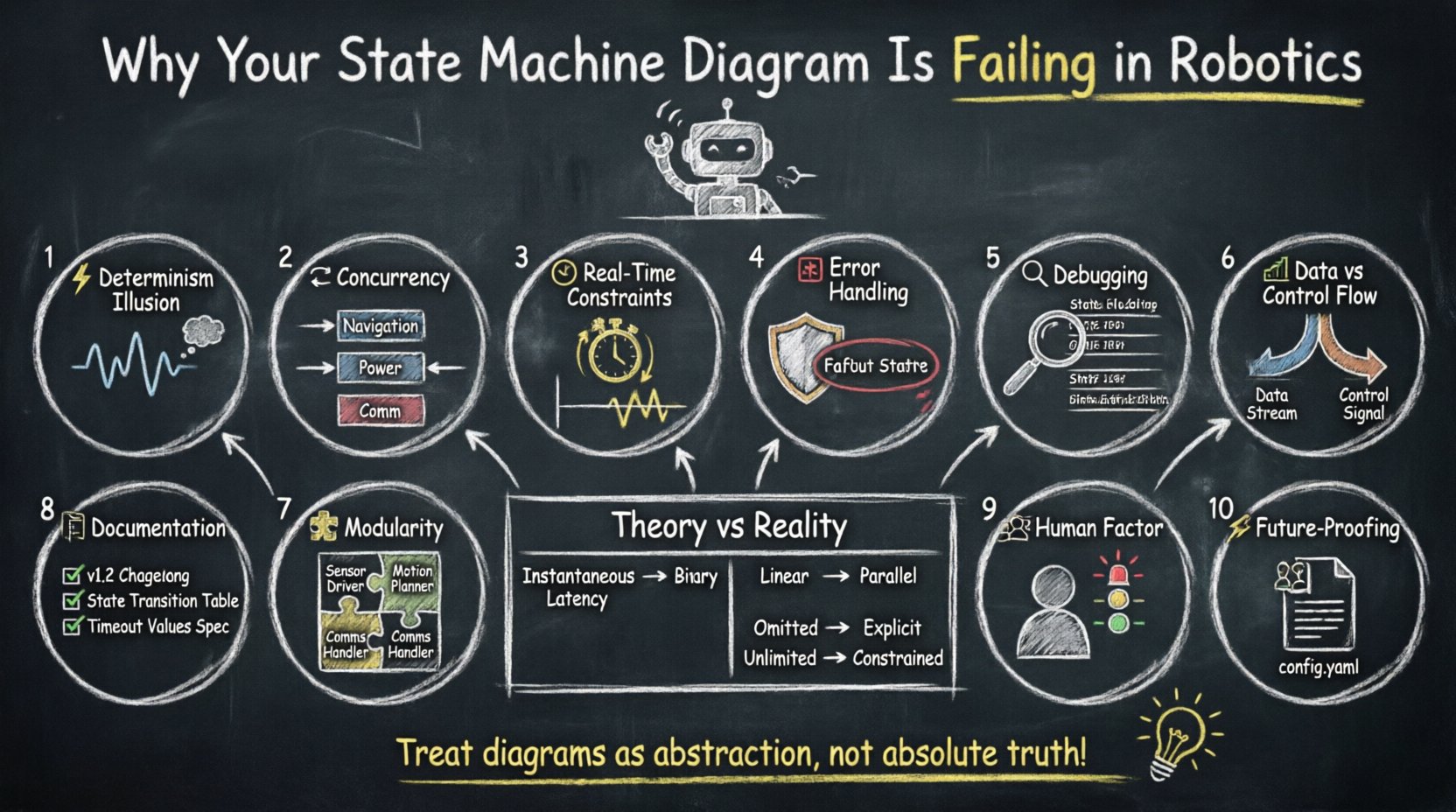
1️⃣ The Illusion of Determinism in Physical Systems
In theoretical computer science, a state machine operates in a vacuum. Transitions are instantaneous, and inputs are perfectly synchronized. In robotics, however, the physical world introduces latency, noise, and variance. A state machine diagram typically assumes that if the robot is in State A and Event X occurs, it moves to State B. This logic holds true in simulation, but hardware introduces variables that diagrams rarely capture.
- Signal Latency: Sensors do not report data instantly. A distance sensor might report an obstacle 20 milliseconds after the robot hits it. The state machine sees the event late, potentially causing a collision before the transition logic executes.
- Event Ordering: In a multi-threaded environment, two events might trigger simultaneously. The state machine diagram usually shows them sequentially, but the processor might handle them in a different order, leading to unintended states.
- Hardware Degradation: A motor might draw more current than expected, triggering a power management state unexpectedly. The diagram assumes nominal operating conditions.
To mitigate this, you must treat the state machine not as the absolute truth, but as a high-level abstraction. The implementation layer must include buffering, debouncing, and timing checks that the visual diagram does not explicitly show.
2️⃣ Concurrency and Parallel States 🔄
One of the most significant limitations of basic state machine diagrams is their linear nature. Robotics applications are inherently concurrent. A robot must navigate while listening for emergency stop commands, monitoring battery levels, and communicating with a base station simultaneously. Traditional sequential state machines force you to create complex nested states or combinatorial explosion of states to represent parallel behaviors.
The Hierarchical Problem
When you try to model parallel activities using standard UML hierarchy, the diagram becomes unreadable. You end up with a “spaghetti chart” where every combination of navigation status and battery level requires a unique state. This approach is brittle. If you add a new sensor or a new safety protocol, you must rewrite dozens of states.
The Solution: Orthogonal Regions
Advanced state machine implementations support orthogonal regions. This allows the system to run multiple independent state machines in parallel. For example:
- Region 1: Navigation (Moving, Stopped, Obstacle Avoidance)
- Region 2: Power Management (Charging, Low Battery, Normal)
- Region 3: Communication (Connected, Disconnected, Syncing)
Without this capability, your diagram is failing because it cannot represent the true architecture of the system. The visual model must match the logical execution model. If the implementation uses a single thread of control, the diagram is a lie.
3️⃣ Timing and Real-Time Constraints ⏱️
UML State Machines do not natively encode timing constraints. They describe what happens, not when it happens. In robotics, timing is often more critical than logic. A navigation state machine might transition to “Emergency Stop” if an obstacle is detected. If the detection logic takes 100 milliseconds, the robot has already moved significantly.
Consider the following scenarios where timing breaks the diagram:
- Timeouts: A state machine might wait indefinitely for a signal. In the real world, waiting indefinitely is a system failure. Timers must be explicit.
- Scan Rates: Sensors scan at specific intervals. A state transition might be triggered between scan cycles, causing the logic to miss the event entirely.
- Jitter: Operating system scheduling can cause delays. A state machine designed for 1ms precision will fail if the underlying OS introduces 50ms jitter.
Effective diagrams for robotics must annotate states with timing requirements. If a state requires a 50ms response window, the diagram should reflect that constraint, even if the software implementation handles it separately.
4️⃣ Error Handling and Fault Tolerance 🛑
Most state machine diagrams focus on the happy path. They show how the robot moves from Start to Goal. They rarely show what happens when the arm motor burns out, the Wi-Fi drops, or the battery voltage dips below safe levels. In software, errors are exceptions. In robotics, errors are the default state of the universe.
Missing Error States
If your diagram does not explicitly model failure modes, your system is fragile. You need states for:
- Sensor Failure: What if the lidar stops returning data?
- Actuator Lock: What if a wheel is physically jammed?
- Logic Timeout: What if the robot gets stuck in a loop?
The Safety Net
Robust systems implement a global error state that can be entered from any state. This is often called a “Watchdog” or “Safe Mode” state. If any logic branch hangs or produces invalid data, the system must force a transition to this safe state. A standard diagram often hides this behind implementation details, making it invisible to stakeholders and future maintainers.
| Feature | Theoretical Diagram | Real-World Implementation |
|---|---|---|
| Transitions | Instantaneous | Subject to latency and jitter |
| Inputs | Binary (True/False) | Noisy, analog, or missing data |
| Concurrency | Linear or Nested | Parallel threads and processes |
| Errors | Often omitted | Must be explicit and prioritized |
| Memory | Unlimited | Constrained by embedded hardware |
5️⃣ Debugging and Visualization Challenges 🔍
When a state machine fails in production, debugging is difficult. Standard diagrams are static documents. They do not show the history of states. They do not show the timing of events. They do not show the data values that triggered a transition.
To make state machines debuggable in robotics, you need:
- State Logging: Every transition should be logged with a timestamp and the values of relevant variables.
- History States: The diagram should support “History” transitions. If the robot was in State A, went to State B, and then State B crashed, it should know to return to State A, not a default state.
- Traceability: The code must be traceable back to the diagram. If a transition logic is complex, the diagram should explain the condition, not just the arrow.
Without these tools, the diagram is merely a picture. It is not a specification. Engineers will revert to writing logic directly in code without referring to the visual model, rendering the diagram obsolete.
6️⃣ Data Flow vs. Control Flow 📊
A common pitfall is confusing control flow with data flow. State machines control the mode of the robot, but they do not manage the data. The robot’s perception system, planning algorithm, and actuation system all generate data streams. The state machine must coordinate these streams without becoming a bottleneck.
If your state machine tries to process sensor data directly, it will fail. It should trigger events that cause other processes to handle the data. For example:
- State Machine: Transitions from “Moving” to “Scanning”.
- Perception Thread: Receives the “Scanning” event and increases camera frame rate.
- Planning Thread: Receives the “Scanning” event and pauses trajectory updates.
Decoupling the control logic from the data processing logic is essential. The state machine diagram should clearly show these handoffs as events, not as data processing steps.
7️⃣ Managing Complexity with Modularity 🧩
As the robot becomes more capable, the state machine grows. A simple pick-and-place robot might have five states. A mobile manipulator might have fifty. A fifty-state machine is impossible to maintain if every state interacts with every other state.
Adopt a modular approach. Break the system into subsystems:
- Locomotion State Machine: Handles wheels, legs, or tracks.
- Manipulation State Machine: Handles arms, grippers, or tools.
- Communication State Machine: Handles network handshakes and data links.
These subsystems communicate via events. This reduces the cognitive load on the engineer. You can verify the Locomotion State Machine independently of the Manipulation State Machine. This modularity is the only way to scale state machine architectures for complex robotics.
8️⃣ Documentation and Maintenance 📝
A state machine diagram is a living document. Code changes, requirements change, and hardware changes. If the diagram is not updated alongside the code, it becomes misinformation. This leads to the “spaghetti diagram” problem where the visual model bears no resemblance to the executable logic.
Best practices for maintenance include:
- Version Control: Treat the diagram file as code. Commit changes with the same rigor.
- Code Generation: Where possible, generate code from the diagram or use a framework that keeps them in sync.
- Change Logs: When a transition is added or removed, document the reason. Was it a safety fix? A performance optimization?
Documentation should not just describe the states. It should describe the why. Why is this transition guarded? Why does this state take priority over that one? These decisions are critical for future engineers who did not write the original code.
9️⃣ The Human Factor in Design 👥
Finally, consider the human operator. The state machine dictates how the robot behaves, which dictates how humans interact with it. If the robot enters a “Busy” state for 10 minutes, the operator might think it is broken and try to intervene. If the robot enters “Paused” without a clear status light, the operator might assume it is stuck.
The state machine must align with human expectations. Transitions should be visible, audible, or signaled in a way that the human operator understands. This is often overlooked in technical diagrams, which focus purely on logic correctness rather than user experience. A robot that is logically correct but confusing to operate is a failed product.
🔟 Future-Proofing Your Architecture 🚀
Robotics technology evolves rapidly. New sensors, new actuators, and new AI models are introduced constantly. Your state machine architecture must be flexible enough to accommodate these changes without a complete rewrite.
Avoid hardcoding state names. Use enums or constants. Avoid hardcoding transition conditions. Use configuration files or parameters where possible. This allows you to tweak behavior without recompiling the entire logic core. It also allows you to test different state configurations in simulation before deploying to hardware.
By focusing on these architectural principles, you move beyond the limitations of the standard UML diagram. You create a system that is resilient, maintainable, and robust enough for the physical world.
Related posts:
 State Machine Diagram vs. Flowchart: Which One Should Your IoT Project Use?
 Troubleshooting State Machine Diagrams: How to Fix Logic Errors in Embedded Systems
 Tutorial: Designing a Finite State Machine Diagram for a Robotics Motion Controller
 State Machine Diagram Deep Drive: How to Optimize Logic for Resource-Constrained IoT Devices

 English
 Arabic
 Chinese (Simplified)
 Dutch
Dutch French
 German
 Italian
 Japanese
 Korean
 Portuguese
 Russian
 Spanish